Building a good ecommerce KPI dashboard starts with picking the right KPIs. You need tools that turn data into clear ideas you can use. These ideas help ecommerce grow by making decisions better. They also make work easier and help plan for the future. Dashboards show how things are going right now. They also point out important trends. FanRuan is a leader in business intelligence solutions. It helps you make smart choices using data.
Contribution to Business Growth
Description
Improved Decision-Making
Dashboards show how things are going right now. Teams can make smart choices fast.
Enhanced Operational Efficiency
Dashboards help find trends and fix problems. They make campaigns work better.
Strategic Planning
Dashboards help plan for the future. They look at past results and spot trends that happen again.
What Is an Ecommerce KPI Dashboard
Core Functions and Value
An ecommerce KPI dashboard shows how your business is doing. It lets you check important numbers and see patterns. You can make better choices with this information. The dashboard puts all your KPIs in one spot. This makes it easy to see what works and what needs fixing.
You can pick different dashboard templates for each person. For example, a sales manager looks at sales KPIs. A support manager checks customer service KPIs. You can click on each KPI to see more details. You can compare results to your goals. Many dashboards let you save favorite reports. You can set alerts for big changes.
Function
Description
Tracking KPIs
All your KPIs are in one simple place.
Drilling Down
Click each KPI to see patterns and compare to goals.
Role-based Customization
Change the dashboard for each person’s needs.
Customization
Save favorite reports and set alerts for important changes.
A good ecommerce KPI dashboard helps you get more sales. It helps you earn more money and makes customers happier. You can also spend less and manage inventory better by watching the right KPIs.
Why Ecommerce Needs KPI Dashboards
Running an ecommerce business without a KPI dashboard is tough. Your data can be spread out on many platforms. This makes it hard to track how things are going. You might spend lots of time making reports by hand. This can cause mistakes.
A KPI dashboard fixes these problems. It puts all your data together and shows results right away. You can see if your website is slow. You can see if customers leave after one page. You can see if people abandon their carts. You can track how fast your team answers questions. You can see how happy buyers are after shopping.
Challenge
Explanation
Data Fragmentation
Data is on many platforms, so tracking is hard.
Data Accuracy
Different sources can make reports wrong.
Manual Reporting Processes
Doing reports by hand takes time and can cause mistakes.
Define KPIs for Success in Ecommerce KPI Dashboard
Align KPIs with Business Goals
Pick KPIs that fit your business goals. Key performance indicators help you see if your business is doing well. When you have clear goals, you can choose the best KPIs. For example, if you want more sales, watch conversion rates and average order value. If you want customers to come back, check retention rates.
Criteria
Description
Specific
Each KPI should clearly show what you measure.
Measurable
KPIs need a number you can count.
Achievable
Goals should be possible to reach.
Relevant
KPIs must match your business goals.
Time-bound
Each KPI needs a set time to check progress.
You can look at kpi dashboard examples to find good KPIs for your business. Here are some KPIs that show how well ecommerce is doing:
KPI Type
Example KPI
Sales
Total Sales
Sales
Average Order Value (AOV)
Sales
Gross Profit
Sales
Customer Retention Rate
Sales
Conversion Rate
Sales
Shopping Cart Abandonment Rate
Sales
Customer Lifetime Value (CLV)
Sales
Revenue Per Visitor (RPV)
Marketing
Website Traffic
When your KPIs match your goals, you can track how you are doing and make your dashboard better.
Avoid Vanity Metrics
Do not use vanity metrics in your kpi dashboard. Vanity metrics look nice but do not help your business grow. They do not show real progress. For example, pageviews or social follower counts may look big, but they do not mean more sales or better results.
Pageviews
Total visitors
Time on site
Social follower counts
If you use actionable KPIs, you get better results. Actionable metrics help you make smart choices. They show what helps your business grow. Vanity metrics can trick you and waste your time.
Metric Type
Description
Impact on Ecommerce Performance
Actionable Metrics
Metrics that help business goals, like conversion rates
Give ideas for smart decisions
Vanity Metrics
Metrics that look good but do not help your business
Can keep you from seeing what really matters
Picking the right KPIs for your ecommerce kpi dashboard helps you see progress, make better choices, and grow your business.
Choose Tools for Ecommerce KPI Dashboard Integration
Why FineBI by FanRuan
You need a good tool to make a strong ecommerce dashboard. FineBI by FanRuan-en is a great choice for your ecommerce kpi dashboard. FineBI lets you connect to many data sources like databases, files, and APIs. It has easy self-service options. FineBI works with Asian languages and data formats. This makes it perfect for businesses in Asia. You can use FineBI to check kpi dashboard examples and watch performance tracking live.
FineBI helps you handle kpi data from different places. You can see all your ecommerce numbers in one spot. You do not need to know how to code to use FineBI. You can drag and drop charts and tables to build your own kpi dashboard. You can set alerts for important kpi changes. FineBI lets you share dashboards with your team and pick who can see each kpi.
FineBI links to popular Chinese business systems and databases.
You can use FineBI for live data integration.
The platform gives you easy access to kpi dashboard examples.
FineBI supports self-service analytics for quick decisions.
You need to connect many data sources to get the best from your ecommerce kpi dashboard. FineBI makes this easy. You can link your ecommerce platform, CRM, website analytics, and social media accounts. Live data integration gives you instant access to all your kpi data. This helps you make better choices and work faster. You can change marketing plans and get more sales.
Best Practice
Description
Real-time data integration
Connect dashboards to live data for correct and useful kpi tracking.
Collaboration with stakeholders
Work with teams to set kpi goals and track performance.
Prioritizing key metrics
Focus on kpi metrics that help your business goals.
Effective data visualization
Use dashboards to make kpi data easy to see and use.
Regular reviews
Check your dashboard every month or quarter to keep kpi data up to date.
You can use FineBI to mix data from different places. You can see kpi dashboard examples that show how to track sales, conversion rates, and customer retention. FineBI helps you see kpi data and find trends fast. You can make performance tracking better and make smarter choices for your ecommerce business.
Prepare and Process Data for Ecommerce KPI Dashboards
Data Cleaning and Transformation
You need your data to be clean and correct for a good ecommerce kpi dashboard. Good data helps you track KPIs the right way. Bad data can make you miss orders or show wrong sales numbers. If reasons for cancellations are not the same, you cannot find problems easily. If logistics data does not match, you might make mistakes when checking performance.
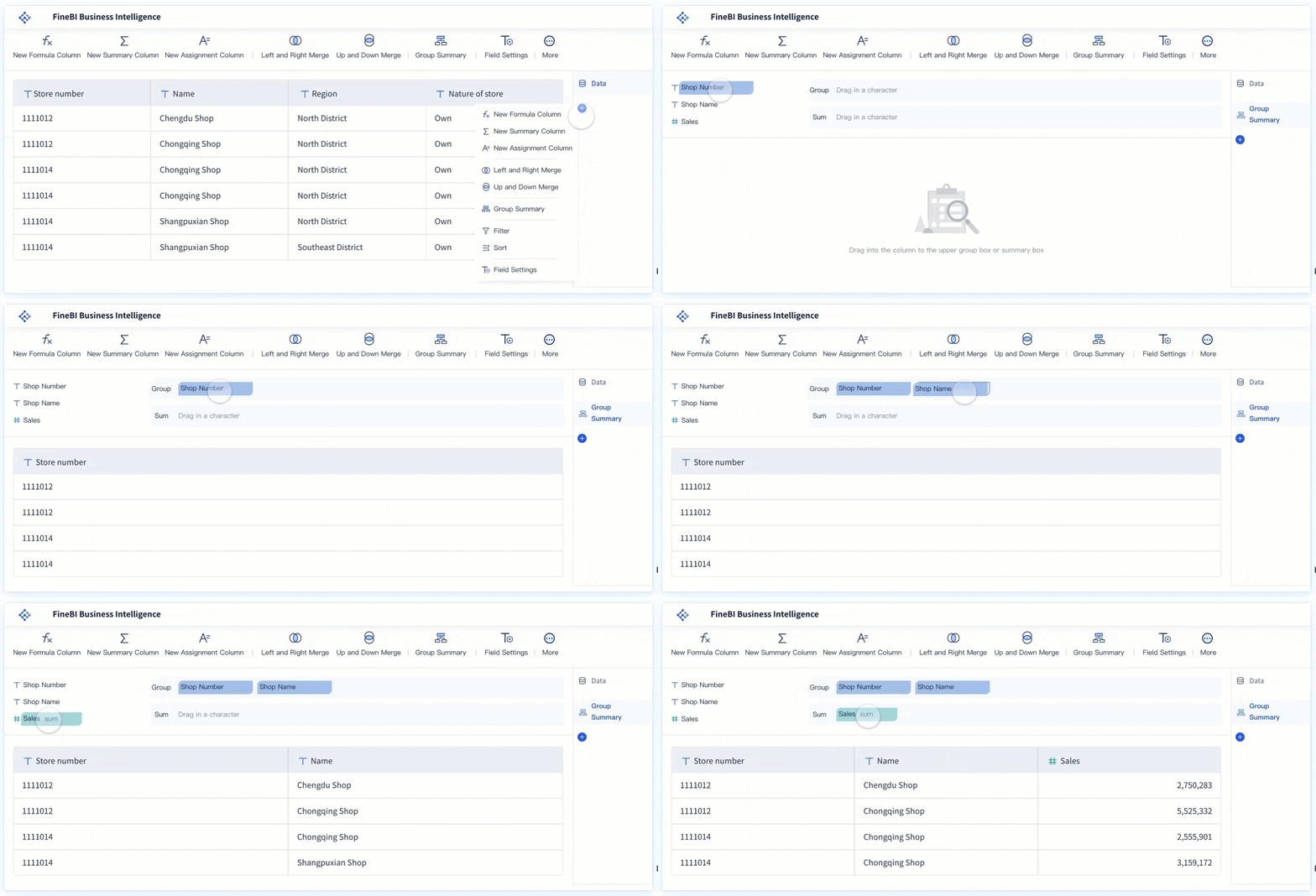
FineBI can help you clean and change your data. FineBI uses ETL and ELT to fix mistakes and join data sets. You can find repeated data, fill in missing spots, and make formats the same. Data profiling lets you check your data sources and find problems. Data matching helps you compare data sets and spot repeats or price changes.
Technique
Description
Example
Data Cleansing
Fixing inaccurate, duplicate, or corrupt data.
You can make sure your product catalog is correct before sharing it with your team.
Data Profiling
Reviewing data sources for structural and content issues.
You might find phone numbers formatted wrong after moving data to new software.
Data Matching
Comparing datasets to find identical data or duplicates.
You can compare your catalog with competitors to spot pricing differences.
Creating Self-Service Data Sets
You can let your team make their own data sets in FineBI. This means people can build dashboards without waiting for IT. You can drag and drop data into templates. The charts are interactive, so you can look for patterns. You can change dashboards to fit your business.
Self-service BI tools make building a kpi dashboard simple. You can turn hard data into easy ideas. Interactive tools let you click for more details. Teams can share reports and dashboards with everyone. This helps people decide faster and work together better.
Feature/Benefit
Description
Independence
Teams can analyze data without IT support.
Customization
Users can create tailored KPI dashboards and reports.
Quick Decision-Making
Autonomy leads to faster insights and actions.
Collaboration
Reports and dashboards can be shared across the organization.
You can follow these steps to get your data ready for your ecommerce kpi dashboard:
Pick your KPIs.
Talk with your team.
Draw your dashboard plan.
Choose your KPI dashboard tool.
Collect your main data.
Make your data charts.
Plan a feedback meeting.
Launch your dashboard.
Build a High-Converting Ecommerce KPI Dashboard
Dashboard Layout and Visualization
You want your high-converting ecommerce dashboard to be clear and easy to use. Start by thinking about who will use the dashboard. A manager, a marketing lead, and a warehouse worker all need different KPIs. When you build your kpi dashboard, always keep your audience in mind. Show the most important kpi at the top. Place supporting kpi below. This helps users find what they need fast.
A good dashboard tells a story. Use the right chart for each kpi. Line charts show trends over time. Bar charts compare sales between products. Pie charts show how much each item adds to the total. When you pick the right chart, you help users understand the data and take action.
Plan your dashboard layout before you start. Put the most important kpi in a spot that stands out. Use color to highlight key numbers. Group related kpi together. This makes your high-converting ecommerce dashboard easy to scan.
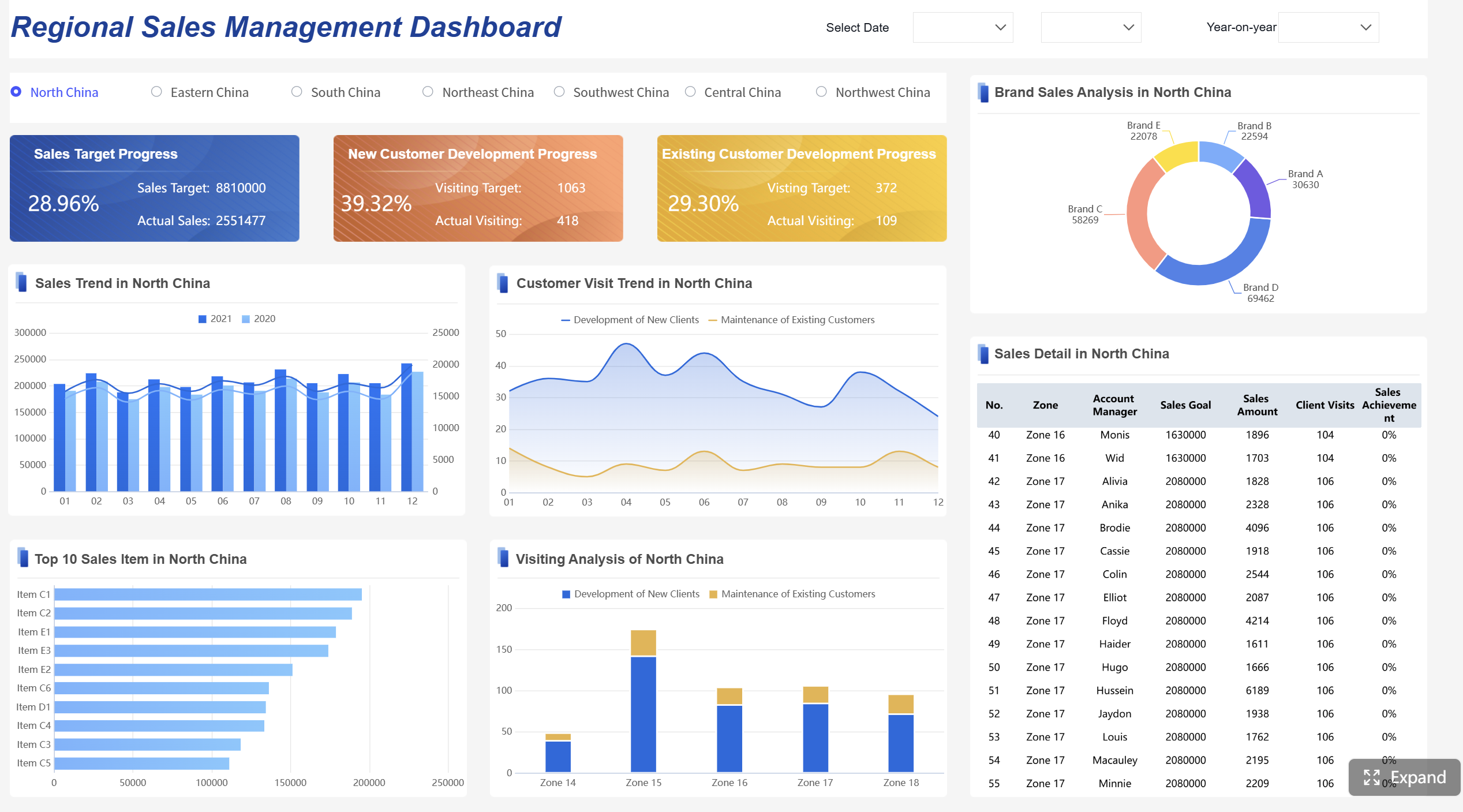
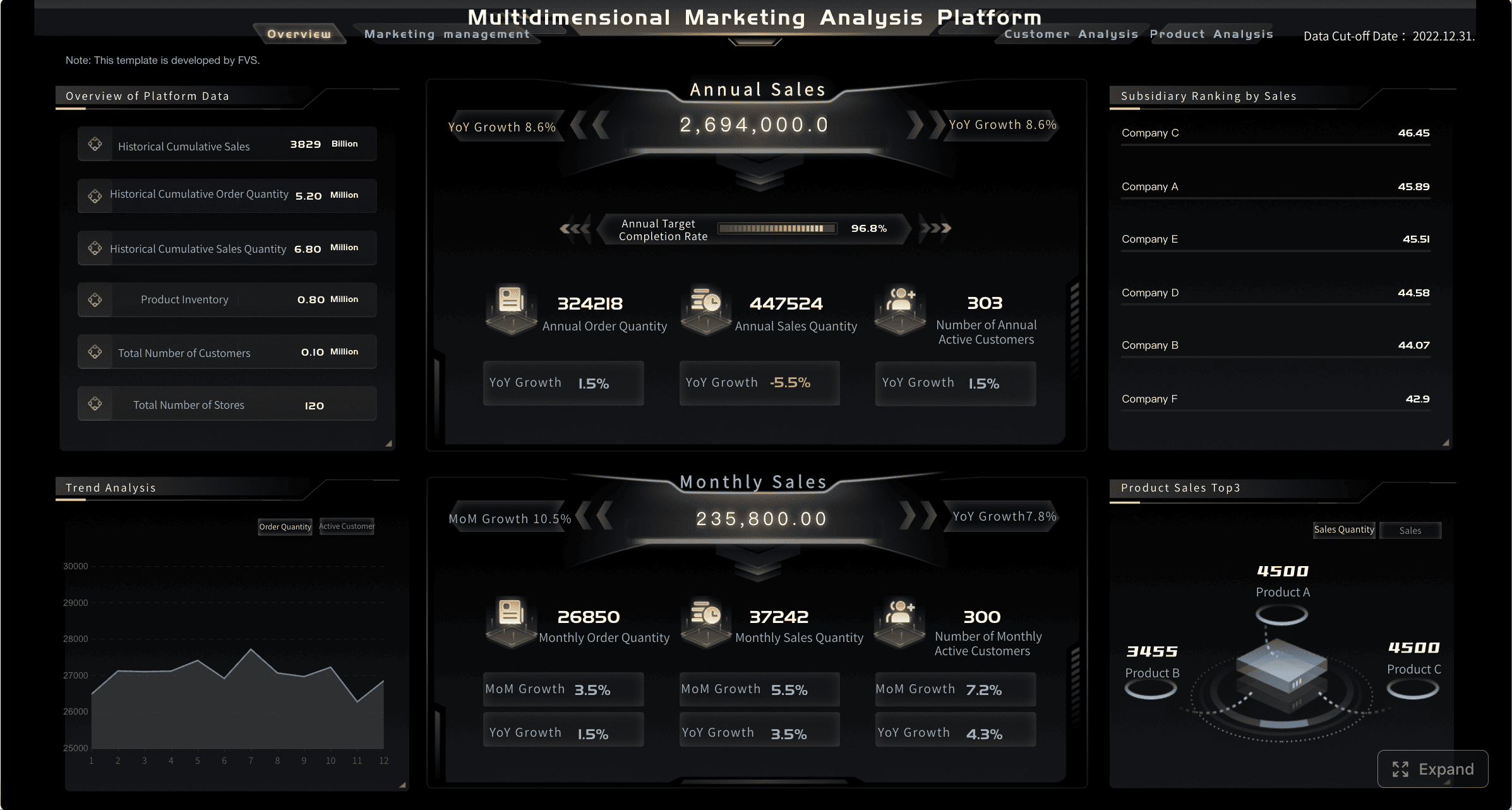
FineBI gives you a drag-and-drop interface. You can add charts, tables, and images with a few clicks. You do not need to write code. You can move items around until your dashboard looks just right. FineBI also makes your dashboard responsive. It works on computers, tablets, and phones. This means you can check your kpi dashboard anywhere.
Here are some best practices for dashboard layout and visualization:
Keep your audience in mind. Show the right kpi for each user.
Tell a story with your data. Use charts that match your message.
Plan your layout. Put the most important kpi in a clear spot.
A high-converting ecommerce dashboard uses these steps to turn data into action. You help your team see what matters and make smart choices.
Interactive Features and Real-Time Filters
A high-converting ecommerce dashboard needs more than good charts. You want users to explore the data. FineBI lets you add interactive features. Users can click on a kpi to see more details. They can filter the dashboard by date, product, or region. This makes the kpi dashboard powerful and flexible.
Real-time filters help you react fast. You can see sales for today, this week, or last month with one click. You can check how a new campaign changes your kpi right away. This keeps your ecommerce business quick and ready for change.
Benefit
Explanation
Faster insights
Immediate access to information enables quicker responses to market changes.
Operational efficiency
Automation of processes reduces time spent on manual data handling.
Critical decision-making
Timely and accurate data is essential for making informed decisions quickly.
FineBI supports real-time filters and interactive dashboards. You can set up global filters that change all charts at once. You can drill down into a kpi to see what drives the numbers. You can set alerts for big changes in your kpi. This helps you spot problems and act before they grow.
You can also share your dashboard with your team. FineBI lets you control who can see each kpi. You can send reports by email or let users log in to see live data. This makes your high-converting ecommerce dashboard a tool for teamwork.
A good kpi dashboard does more than show numbers. It helps you find answers, spot trends, and make better decisions. With FineBI, you get a dashboard that grows with your ecommerce business. You can track every kpi, adjust your strategy, and keep your performance tracking sharp.
Optimize and Monitor Your Ecommerce KPI Dashboard
Customization for Different Roles
You can make your ecommerce KPI dashboard work better by changing it for each person. People in your company need different information. When you change the dashboard, you help everyone focus on the KPIs that matter most for their job.
Executives see big summaries. They check how the business is doing with the dashboard.
Marketers look at campaign data. They use the dashboard to find which ads or deals work best.
Operations managers watch staff and inventory. Their dashboard helps them fix problems and work faster.
When you set up your KPI dashboard in FineBI, you can pick who sees each KPI. You can also change the layout so each team member gets the right view. This makes tracking easier and helps everyone make smarter choices.
Continuous Improvement and Alerts
Your ecommerce KPI dashboard should always get better. You need to check your dashboard often to keep up with changes in your business. Regular checks help you find what works and what needs fixing. You can make the dashboard better based on what you learn.
Check data often to spot trends and things that need attention.
Make the dashboard more useful for your team.
Use what you learn to make things better.
Review the dashboard every few months to match new goals.
Ask for feedback to find missing KPIs or features.
Watch how people use the dashboard to see which KPIs matter most.
Automate updates to save time and stop mistakes.
Change KPIs as your business grows or adds new channels.
Feedback loops help your business do well for a long time. When you listen and act on feedback, you make customers happier and keep them coming back. A good feedback system means you listen, check, and make changes. Then you tell your team about the improvements.
Ecommerce KPI Dashboard Best Practices
Common Mistakes to Avoid
When you make your ecommerce kpi dashboard, watch out for mistakes. These mistakes can make your dashboard less helpful and slow business growth. Sometimes, teams forget to pick someone in charge. If no one owns the kpi dashboard, it does not work well. Tracking kpi by hand is also a problem. Manual tracking takes a lot of time and can cause mistakes. Some teams do not check their dashboard often. If you do not review it, you might miss new ecommerce trends.
You should not set kpi without asking your team. If only one person picks the kpi, you might miss key metrics. Goals that are too broad make it hard to know what to fix. If teams do not work together, people get confused. If you ignore feedback that is not numbers, you miss important ideas.
Mistake
Explanation
Lack of ownership
No one feels responsible for the kpi dashboard, so results suffer.
Manual tracking
Tracking kpi by hand wastes time and causes mistakes.
Infrequent reviews
Not checking the dashboard often leads to outdated kpi.
Setting KPIs without team input
Missing team ideas can make the dashboard less effective.
Broad objectives
Goals that are too wide make it hard to act.
Lack of collaboration
Teams do not work together, so the dashboard loses value.
Ignoring qualitative measures
Only using numbers can hide real problems or wins.
Proven Tips for Effective KPI Tracking
You can make your ecommerce kpi dashboard better by following some tips. Use good data collection tools to track kpi automatically. This makes your dashboard more correct. Use data management tools to see all your ecommerce data in one place. Set goals that make sense by looking at industry benchmarks. This helps you find ways to get better.
Always try to improve your dashboard. Test new ideas and update your dashboard as your business grows. Use analytics tools to find patterns and trends in your data. Good monitoring systems help you track kpi in real time. This way, you always know how your ecommerce business is doing.
Proven Tips for Ecommerce KPI Tracking
Description
Robust Data Collection Systems
Automate data collection for accurate kpi dashboard results.
Integrated Data Management Solutions
Break down data silos for a complete dashboard view.
Setting Realistic Targets
Use benchmarks to set smart kpi goals.
Continuous Improvement Initiatives
Update your dashboard as your ecommerce business changes.
Leveraging Advanced Analytics Tools
Use analytics to find trends in your dashboard data.
Robust Monitoring Systems
Track kpi in real time for the best dashboard performance.
Running an ecommerce business can be hard. BOE Technology Group had data in many places. They could not see all their kpi together. Their metric definitions were not the same. This made comparing results tough. Tracking progress was also difficult. BOE used manual reports and spreadsheets a lot.
BOE chose FineBI to fix these problems. You can learn from what they did. FineBI helped BOE build a strong kpi dashboard. They brought data from different sources into one place. They made a data warehouse to keep information safe. They made kpi definitions the same for everyone. This helped departments compare results easily. FineBI let BOE automate how data was added. Teams could now use dashboards to track kpi live.
Results and Business Impact
You can see big changes when you use a kpi dashboard like BOE. BOE lowered inventory costs by 5%. They made their work faster by 50%. Teams could watch kpi and find risks early. Dashboards helped them compare factories. This showed gaps and helped them improve quickly.
BOE’s story shows how FanRuan solutions help ecommerce and retail. You can use dashboards to track kpi and find trends. You can make better choices for your business. Real-time insights help your business grow. You can make kpi the same and build dashboards that are easy for everyone.
You can make a good ecommerce KPI dashboard if you follow these steps. First, pick KPIs that match your goals. Next, use FineBI to link and fix your data. Then, create dashboards that are easy to read and use real-time features. Last, check your dashboard often and make it better.
Product Trial
FineReport
Pixel-perfect reports · Interactive dashboards · Easy data entry · Digital twins
Access a wealth of case studies, industry insights, and solution guides to accelerate digital transformation.
FAQ
What is a KPI dashboard in ecommerce?
A KPI dashboard in ecommerce shows your key numbers in one place. You can track sales, customer actions, and website performance. This helps you see what works and what needs improvement.
How often should you update your ecommerce KPI dashboard?
You should update your dashboard as often as your data changes. Many businesses update daily or in real time. This keeps your insights fresh and helps you react quickly.
What KPIs should you track for ecommerce success?
You should track sales, conversion rate, average order value, customer retention, and cart abandonment. These KPIs help you understand your business health and spot growth opportunities.
Why is data cleaning important for KPI dashboards?
Clean data gives you accurate results. Dirty data can hide problems or show wrong trends. You need clean data to trust your dashboard and make smart decisions.