AI with access to real-time data is software that uses live web signals, current business metrics, or connected internal systems to generate answers, insights, and actions based on what is happening now rather than yesterday’s data.
10 free AI with access to real time data compared: strengths, trade-offs, and best-fit use cases
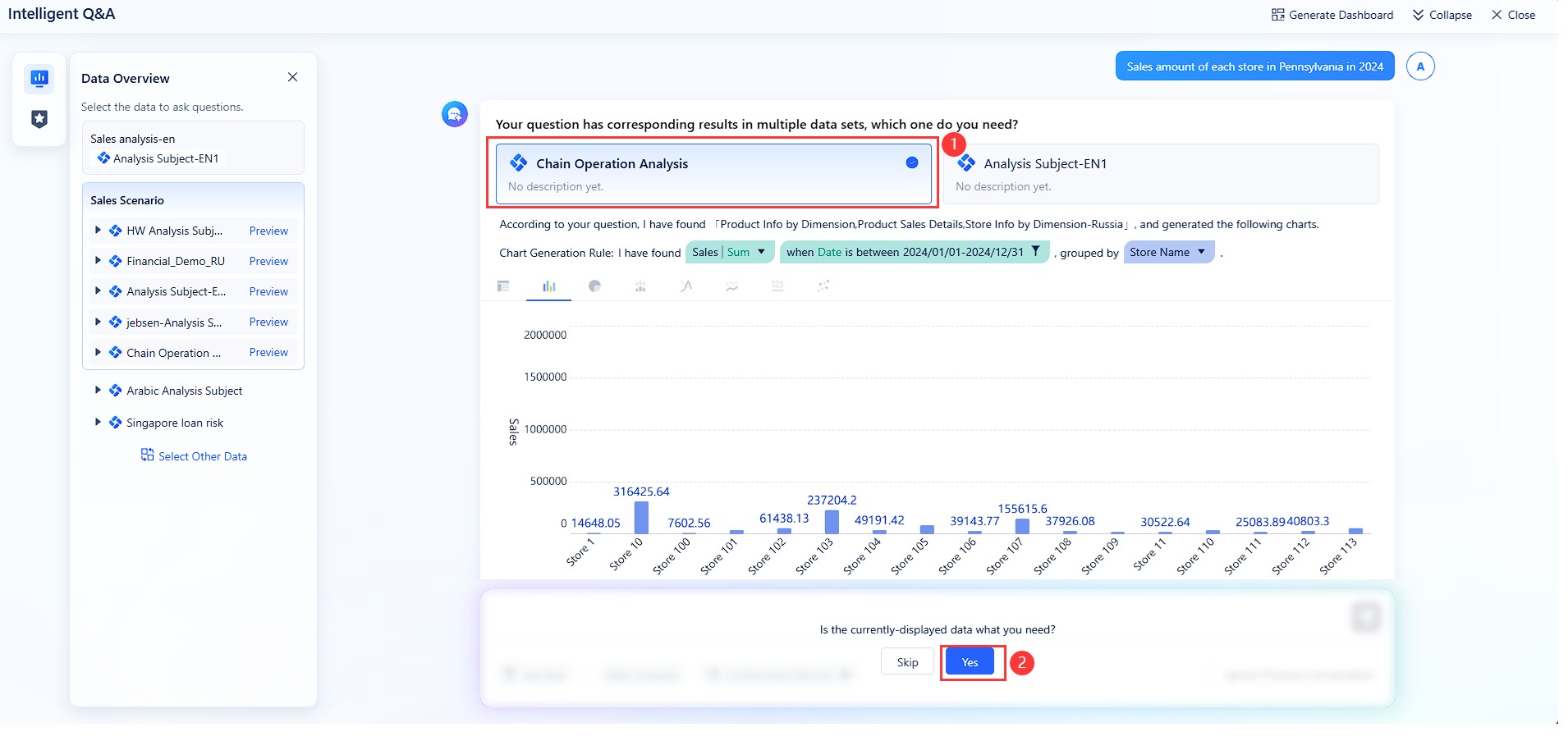
Dora is a conversational AI analytics and decision-support platform built for business teams that need real-time visibility across operational data, dashboards, and connected workflows.
One-sentence overview: Dora helps teams ask business questions in natural language and get fast answers grounded in current data across reporting and analytics environments.
Key Features:
Natural-language querying for business metrics
Real-time analytics access across connected data sources
Dashboarding and reporting support
Team-friendly decision workflows
Suitable for cross-functional use cases such as sales, operations, and management reporting
Pros & Cons:
Pros: Strong fit for business decision support; easier for non-technical users than traditional BI; well suited to real-time reporting scenarios
Cons: Best value depends on your existing data setup; advanced enterprise needs may require broader implementation beyond a basic free evaluation
Best For (Target user/scenario): Business teams that want one AI layer for live reporting, KPI checks, and operational decision-making without relying entirely on analysts
Dora stands out as the most balanced option for organizations that want ai with access to real time data for practical business use, not just web answers. If your team needs current dashboards, operational metrics, and a more structured path from question to action, Dora is the first tool to evaluate.
Perplexity is a web-connected AI search assistant designed for fast, current answers and live research.
One-sentence overview: Perplexity pulls recent web information into conversational responses, making it useful for market monitoring and quick competitive scans.
Key Features:
Real-time web search
Source-backed summaries
Follow-up question handling
Fast synthesis of news, trends, and public information
Pros & Cons:
Pros: Excellent for current events; easy to use; strong for research workflows
Cons: Limited for internal business data; not a full analytics or workflow platform
Best For (Target user/scenario): Marketing, strategy, and sales teams tracking competitors, industry changes, and live public information
3. ChatGPT
ChatGPT combines general-purpose AI assistance with browsing and connected-tool capabilities in selected plans and workflows.
One-sentence overview: ChatGPT is versatile for summarizing current information, drafting outputs, and assisting with fast business research when live browsing is available.
Key Features:
Conversational assistance
Browsing for current web content
File analysis
Writing, summarization, and ideation support
Pros & Cons:
Pros: Flexible for many tasks; strong writing and reasoning; useful for mixed research and execution workflows
Cons: Real-time performance varies by setup; free access limits may affect browsing or advanced features
Best For (Target user/scenario): Small teams that need one assistant for research, drafting, and lightweight analysis
4. Microsoft Copilot
Microsoft Copilot brings AI assistance into Microsoft’s productivity and work environment.
One-sentence overview: Copilot is useful for teams that want current answers and productivity help inside the Microsoft ecosystem.
Key Features:
Integration with Microsoft 365 apps
Web-grounded responses
Document summarization
Workflow assistance across email, spreadsheets, and meetings
Pros & Cons:
Pros: Strong for existing Microsoft users; productive in daily work; good context within documents and office tasks
Cons: Best experience often depends on Microsoft stack adoption; free-tier depth is narrower than paid enterprise use
Best For (Target user/scenario): Teams already standardized on Microsoft 365
5. Power BI
Power BI is a business intelligence platform with live dashboard and reporting capabilities, especially strong in Microsoft environments.
One-sentence overview: Power BI helps teams monitor real-time metrics, visualize KPIs, and support decisions with connected reporting.
Pros: Mature BI stack; solid dashboarding; good value for structured reporting
Cons: Natural-language analytics still has limits; setup can require technical support
Best For (Target user/scenario): Operations, finance, and leadership teams needing reliable reporting on a budget
6. Google Looker Studio
Looker Studio is Google’s reporting and dashboarding tool for connected marketing and business data.
One-sentence overview: Looker Studio offers accessible, low-cost dashboarding for teams that need current reporting from marketing, web, and spreadsheet sources.
Key Features:
Free dashboards
Google ecosystem integrations
Shareable reports
Data blending for lightweight cross-source visibility
Pros & Cons:
Pros: Free and easy to share; strong for marketing reporting; simple onboarding
Cons: Less powerful than enterprise BI platforms; real-time depth depends on connectors
Best For (Target user/scenario): Marketing and small business teams tracking campaigns, traffic, and lead performance
7. Tableau Public / Tableau with live connections
Tableau is a visual analytics platform known for advanced exploration and dashboard design.
One-sentence overview: Tableau is strong for teams that need detailed visual analysis and can connect live data sources for timely decision support.
Key Features:
Advanced visual analytics
Live data connections
Drill-down exploration
Broad connector ecosystem
Pros & Cons:
Pros: Powerful visualization; flexible analysis; widely used across enterprises
Cons: Free options are limited; business self-service often depends on analyst support
Best For (Target user/scenario): Analyst-led teams that need sophisticated dashboards rather than lightweight AI chat alone
8. NotebookLM
NotebookLM is a source-grounded AI workspace for analyzing uploaded content and selected documents.
One-sentence overview: NotebookLM helps teams query internal notes, research files, and documents in a controlled conversational format.
Key Features:
Source-grounded responses
Document summarization
Question answering across uploaded materials
Workspace-style organization
Pros & Cons:
Pros: Useful for internal knowledge access; grounded in provided sources; simple for research-heavy teams
Cons: Not a full real-time systems connector for operations data; works better with curated documents than live transactional systems
Best For (Target user/scenario): Teams managing proposals, research packs, policy docs, and internal knowledge libraries
9. Slack AI-enabled workflows with connected apps
Slack-based AI workflows combine messaging, search, and connected app context inside team collaboration.
One-sentence overview: Slack becomes more valuable as an AI workspace when it can surface current discussions, linked documents, and workflow notifications in one place.
Key Features:
Search across conversations
Integration with apps like CRM, ticketing, and docs
Workflow notifications
Team collaboration in real time
Pros & Cons:
Pros: Meets teams where they already work; useful for lightweight coordination; strong for fast-moving communication
Cons: Insight quality depends on connected tools; not a full analytics platform by itself
Best For (Target user/scenario): Support, operations, and cross-functional teams coordinating daily work across multiple systems
10. Zapier with AI
Zapier combines automation with AI steps and app integrations across thousands of tools.
One-sentence overview: Zapier is ideal for connecting business systems and triggering AI-assisted actions when data changes in real time.
Key Features:
App-to-app automation
AI steps for summarization and classification
Trigger-based workflows
CRM, spreadsheet, support, and form integrations
Pros & Cons:
Pros: Broad integration coverage; useful for workflow automation; practical for repetitive cross-tool tasks
Cons: Not designed as a full conversational analytics layer; free-task volume is limited
Best For (Target user/scenario): Small teams automating lead routing, alerts, form handling, and internal notifications
Quick picks by team type
Here is the short version for budget-conscious teams evaluating ai with access to real time data:
Sales: Dora, Microsoft Copilot, Zapier
Marketing: Perplexity, Looker Studio, ChatGPT
Operations: Dora, Power BI, Slack workflows
Support: Slack workflows, Microsoft Copilot, Zapier
Small cross-functional teams: Dora, ChatGPT, Perplexity
What to look for in AI with access to real time data for business teams
For business buyers, “real-time” can mean very different things depending on the tool category. Some apps fetch live web pages and summarize current events. Others query dashboards that refresh every few minutes. More advanced platforms connect directly to operational systems, data warehouses, CRMs, or messaging tools so teams can act on current business context.
In practice, real-time usually falls into three levels:
Live web updates: Useful for news, competitor monitoring, and market research
Near-real-time business metrics: Useful for dashboards, alerts, and KPI tracking
Connected internal systems: Useful for execution, collaboration, and workflow decisions
It also helps to separate four product types that often get grouped together:
Chat assistants: Good for conversational answers and summaries
Analytics platforms: Built for dashboards, metrics, trends, and reporting
Copilots: Embedded into productivity suites and daily work tools
Workflow automation tools: Trigger actions when new data appears
When comparing tools, use a practical evaluation checklist:
Data freshness: How often does data update?
Accuracy: Are responses grounded in sources, metrics, or governed datasets?
Integrations: Can it connect to your web, docs, CRM, BI, database, and communication tools?
Team collaboration: Can multiple users share answers, dashboards, or workflows easily?
Security: Are permissions, admin controls, and privacy standards clear?
Free-plan limits: Are caps applied to messages, users, dashboards, history, or automations?
The strongest business tools do not just answer questions—they connect fresh data to repeatable team decisions. That is why Dora ranks first: it bridges conversational access with business reporting and operational visibility more effectively than general-purpose assistants.
Pros, cons, and hidden limits of free AI with access to real time data
Where free plans work surprisingly well
Free plans are often enough when the business need is narrow and the team size is small. Common use cases include:
Checking current market news
Summarizing competitor updates
Building simple shared dashboards
Querying small document collections
Automating a few repetitive notifications
Supporting lightweight reporting for a startup or small department
For example, a lean marketing team can use Perplexity for current research, Looker Studio for campaign dashboards, and ChatGPT for drafting analysis summaries. A small operations team might use Dora for live KPI checks and team reporting while keeping more complex implementation for later.
Where free plans break down
The biggest issue with free AI tools is not usually capability—it is scaling the capability.
Common limits include:
Message caps or slower performance
Restricted seats and collaboration controls
Limited connector access
Basic history and retention
Fewer dashboards or data refresh constraints
No advanced governance or row-level permissions
Limited API usage
Automation task caps
These constraints matter most once multiple teams rely on the tool. A free app may look sufficient in testing, then become a bottleneck when finance, sales, and operations all need shared access.
Why AI fails without real-time data—and how to fix it
AI outputs fail when the model is working with stale, incomplete, or disconnected context. In business settings, that usually happens in four ways:
Stale outputs: The tool answers based on old data or cached assumptions
Disconnected systems: The AI cannot see the CRM, BI layer, or current operational records
Weak context: Prompts are too vague, or the tool lacks business definitions
Poor governance: Teams cannot verify what data was used or who should see it
To reduce risk:
Use prompts that specify timeframe, metric definition, and decision goal
Prefer tools that cite sources or connect to governed data
Keep human review in place for high-impact decisions
Map which systems actually need to be connected before rollout
Standardize KPI definitions across teams
Choose platforms like Dora when you need business-facing AI tied to live reporting rather than generic chat alone
The core lesson is simple: AI is only as useful as the freshness and relevance of the context behind it.
How to choose the right AI with access to real time data for your business team in 2026
A simple decision framework
Choose based on the primary job you need the tool to do.
Market research: Perplexity or ChatGPT
Analytics and dashboarding: Dora, Power BI, Looker Studio
If you need one broad tool for multiple business users, Dora is the safest starting point because it supports decision-making across reporting, analytics, and operational contexts.
Are exports, dashboards, and audit trails available?
What are the free-plan limits on users, messages, or connectors?
Is there a realistic upgrade path if adoption grows?
These questions help separate demo-friendly tools from tools that can support daily business use.
The future of AI is real-time data
Business expectations are shifting quickly. Teams no longer want AI that produces polished but outdated answers. They expect tools to work with live context: streaming metrics, current documents, evolving customer records, and operational events as they happen.
That changes what “productivity” means in practice:
Faster responses to market changes
Better alerts and anomaly detection
Fewer decisions based on week-old dashboards
More self-service access for non-technical teams
Stronger alignment across functions using the same current context
In 2026, ai with access to real time data is moving from a useful add-on to a baseline requirement for business software.
Final verdict: best free AI with access to real time data options by business need
Best overall free app for broad business use:Dora
Best free app for real-time analytics and reporting:Power BI
Best free app for web research and current answers:Perplexity
Best free app for internal data access and workflow support:NotebookLM for document-grounded access, Zapier for workflow execution
Best choice when your team will likely need to upgrade soon:Dora
For most business teams, the right choice depends on whether you need current answers, live metrics, or connected execution. If you want a general research assistant, Perplexity and ChatGPT are strong starting points. If you need dashboards, Power BI and Looker Studio remain practical. But if your goal is to give teams a more business-ready layer of ai with access to real time data—one that supports reporting, decisions, and operational visibility in the same workflow—Dora is the most compelling option to test first in 2026.
It means the AI can use live web information, current dashboards, or connected internal systems to answer based on what is happening now. That helps teams make faster decisions than tools that rely only on older or static data.
Tools like Perplexity and ChatGPT are better for live web research and fast public-information answers. Tools like Dora, Power BI, and Looker Studio are a better fit when your team needs current KPIs, dashboards, and operational reporting.
Some can, but it depends on the platform and your setup. General AI assistants are often limited for internal data access, while analytics-focused tools are more likely to support connected business systems and dashboards.
AI outputs are only as useful as the freshness of the data behind them. When data is outdated, teams risk acting on old conditions instead of current trends, issues, or opportunities.
Start with the main use case: live research, writing support, dashboarding, or operational decision support. Then compare data access, ease of use, integrations, and whether the free version is enough for your team’s daily workflow.
Product Trial
FineReport
Pixel-perfect reports · Interactive dashboards · Easy data entry · Digital twins