Choosing the right no code integration platform can make the difference between a smooth, scalable workflow and a patchwork of disconnected apps. In 2026, teams of every size are under pressure to automate repetitive work, move data faster, and reduce manual handoffs without hiring developers for every process.
The good news is that the market now offers strong options for nearly every use case. Some tools are built for speed and simplicity. Others focus on advanced logic, enterprise security, or visual workflow design. The challenge is knowing which platform best matches your workflow, budget, and technical comfort level.
This guide breaks down the top tools to consider, what to evaluate before choosing one, and which platform fits different types of teams best.
What to Look for in a No Code Integration Platform in 2026
Before comparing features, it helps to understand what actually matters in day-to-day use. A no code integration platform should do more than connect apps. It should support the way your team works now while giving you room to grow.
Define the workflows you want to automate before comparing tools
Start with the workflows, not the software.
Many teams choose a platform based on popularity, only to realize later that it does not fit their actual processes. Instead, list the tasks you want to automate first. These might include:
Sending leads from a form into a CRM
Syncing e-commerce orders with accounting software
Routing support tickets to the right team
Updating spreadsheets from project management tools
Creating multi-step onboarding or approval workflows
Once you know what you want to automate, it becomes much easier to judge whether a tool is a good fit.
Check app coverage, trigger types, and support for multi-step automations
Not all platforms support the same apps, triggers, or actions. A tool may claim broad compatibility, but the specific apps your team relies on are what matter.
Look closely at:
Native integrations with your core tools
Trigger options such as webhooks, scheduled runs, form submissions, or status changes
A platform that works for simple one-step syncs may fall short when your workflows become more operationally complex.
Evaluate ease of use, governance, security, and team collaboration features
Ease of use is important, but it is not the only factor.
For solo users and small teams, a simple interface and template library may be enough. For larger organizations, governance features matter just as much. Consider whether the platform includes:
Role-based permissions
Shared workspaces
Version control or change tracking
Approval flows
Audit logs
Security and compliance options
The best no code integration platform for one team may be too limited or too complicated for another.
Compare pricing models, task limits, and scalability for growing operations
Pricing can be misleading if you only look at the starting plan.
Most platforms charge based on task volume, workflow runs, premium app access, or advanced features. A tool that looks affordable at first may become expensive quickly if you automate at scale.
Check for:
Monthly task or operation limits
Charges for premium connectors
Limits on users, folders, or shared workflows
Access to advanced logic on lower plans
Enterprise pricing requirements
Think beyond today’s needs. If your automation volume doubles in six months, will the platform still make financial sense?
9 Best No Code Integration Platform Tools for 2026
Below are the top tools worth considering this year. Each one serves a slightly different type of user, workflow, and business environment.
1. FineDataLink
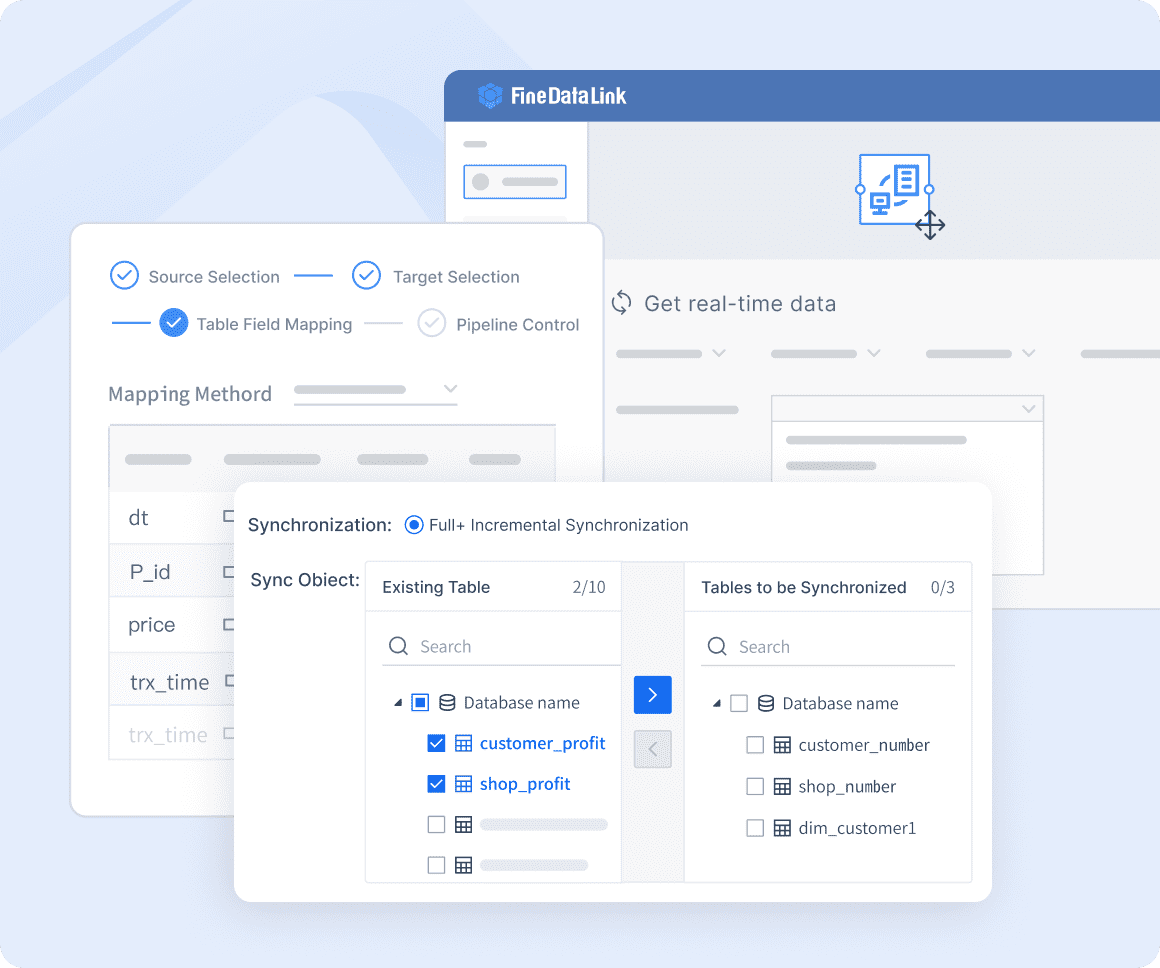
FineDataLink is a strong option for organizations that need more than simple app-to-app automation. It is especially useful where data integration, synchronization, and movement across systems are central to operations.
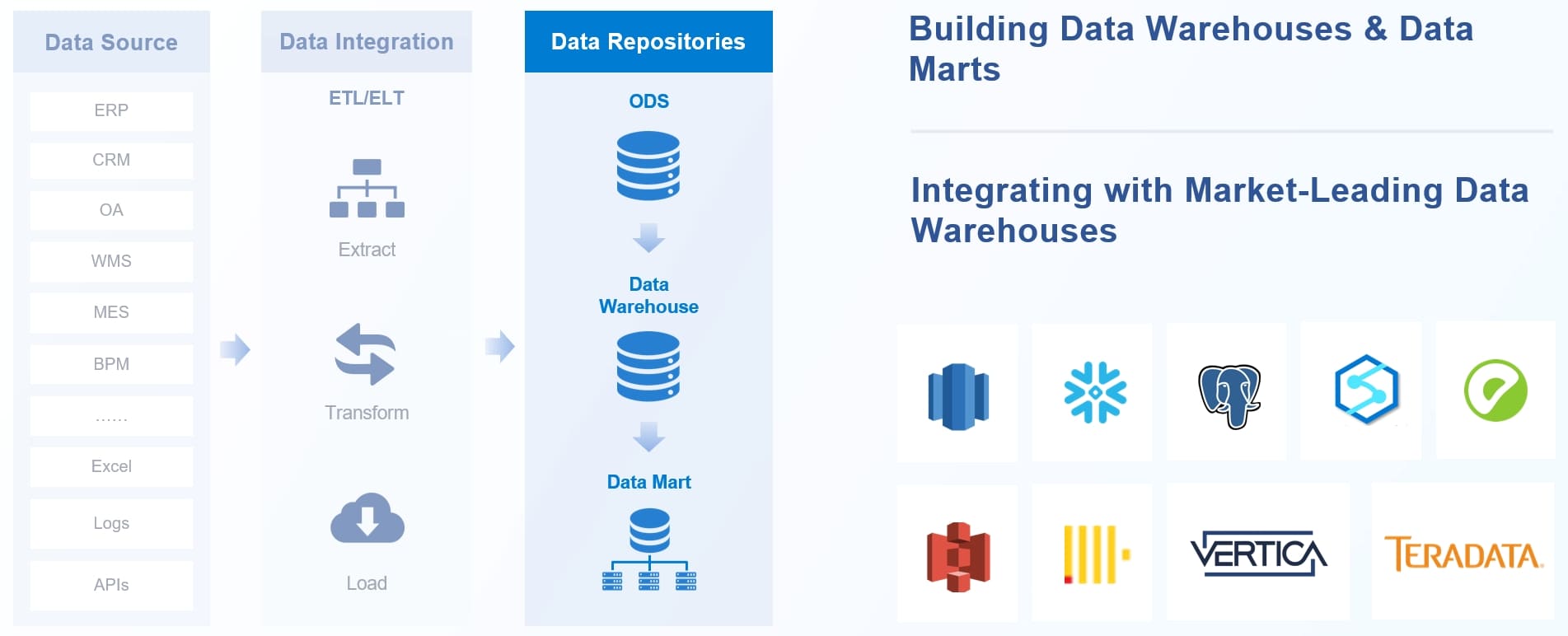
Rather than focusing only on lightweight automations, FineDataLink is well suited for teams that need to connect databases, business systems, APIs, and reporting environments without relying entirely on custom development. That makes it appealing for companies with more data-heavy workflows or mixed system environments.
Helpful for connecting structured business systems, not just common SaaS apps
Useful for teams that need consistent data movement across departments
Better aligned with operational and analytics use cases than basic task automation tools
Potential drawbacks
May be more than some small teams need for simple marketing or admin automations
Can require clearer planning when workflows involve multiple systems and data dependencies
Best fit
FineDataLink is best for teams that need a no code integration platform with stronger data connectivity capabilities, especially across business systems where reliability and structured data movement matter.
Zapier remains one of the most recognizable names in automation, and for good reason. It is often the first choice for teams that want quick setup, broad app support, and minimal friction.
It works especially well for common workflows such as lead routing, CRM updates, email notifications, calendar events, and basic cross-tool automation. Its template library and straightforward builder make it approachable even for users with no technical background.
Best for broad app support and fast setup for common business workflows
Pros
Huge template library
Intuitive builder
Strong ecosystem
Cons
Costs can rise quickly with higher task volume and premium apps
Best fit
Teams that want speed, flexibility, and minimal setup friction will usually find Zapier one of the easiest places to start.
3. Make
Make is a favorite among users who want visual workflow design with more control than simpler automation tools provide. Its scenario builder allows users to map workflows in a highly visual way, making it easier to understand how data moves across steps.
It supports branching, routing, filters, transformations, and more advanced automation patterns that can handle operational complexity without traditional coding.
Best for visual workflow building and more advanced logic without coding
Pros
Powerful scenario builder
Detailed routing
Strong customization
Cons
Steeper learning curve for beginners than simpler alternatives
Best fit
Operations teams that need deeper control over automation paths and data flow will often prefer Make over more basic platforms.
4. Microsoft Power Automate
For companies already committed to Microsoft 365, Dynamics, Azure, and related tools, Power Automate is an obvious contender. It integrates naturally into the Microsoft ecosystem and offers enterprise-friendly features for workflow governance and automation management.
It also supports desktop automation, which is valuable when organizations need to automate repetitive tasks across legacy systems that do not have modern APIs.
Best for organizations already invested in Microsoft 365 and Azure
Pros
Strong enterprise integrations
Governance options
Desktop automation
Cons
Licensing can be complex and the interface may feel less streamlined
Best fit
Companies standardizing automation inside the Microsoft ecosystem will get the most value here.
5. Pabbly Connect
Pabbly Connect appeals to budget-conscious users who want practical automation capabilities without jumping into higher recurring costs. It offers the essentials many small businesses need, including popular app integrations and multi-step workflows.
While it does not match category leaders in ecosystem depth or advanced features, it can be a cost-effective choice for straightforward workflows.
Best for budget-conscious users looking for solid core integrations
Pros
Competitive pricing
Useful automation features
Straightforward setup
Cons
Smaller app ecosystem and fewer advanced capabilities than top-tier tools
Best fit
Small businesses that want affordability over breadth are likely to appreciate Pabbly Connect.
6. Workato
Workato is built for enterprise-grade automation and orchestration. It is designed for organizations that need reliability, governance, advanced integration options, and support for more complex processes spanning both business and IT functions.
This is not typically the first tool a small startup adopts for quick marketing automation. It is more often used by companies that need structured, scalable automation across departments.
Best for enterprise-grade automation across business and IT teams
Pros
Robust governance
Advanced integrations
Strong support for complex processes
Cons
Higher cost and more implementation effort than SMB-focused tools
Best fit
Larger organizations with security, compliance, and scale requirements will find Workato especially compelling.
7. Bardeen
Bardeen takes a different angle from traditional integration platforms by focusing heavily on browser-based workflows and productivity automation. It is especially useful for repetitive tasks involving web apps, research, outreach, enrichment, and personal productivity processes.
Its AI-assisted features also make it attractive to users who want automation help directly inside their browser workflows.
Best for browser-based productivity workflows and AI-assisted automation
Pros
Strong automation for repetitive online tasks
Useful AI features
Cons
Narrower use cases than all-purpose integration platforms
Best fit
Individuals and teams focused on web apps and productivity workflows are likely to get the most value from Bardeen.
8. Integrately
Integrately is designed for users who want automations running quickly without much configuration. It emphasizes one-click setups and simple onboarding, which lowers the barrier for non-technical users.
This makes it ideal for straightforward automations where speed matters more than deep customization.
Best for quick one-click automations with minimal configuration
Pros
Easy onboarding
Simple setup
Accessible for non-technical users
Cons
Less flexibility for highly customized or complex workflows
Best fit
Users who prioritize simplicity and speed over advanced logic will likely enjoy Integrately.
9. Albato
Albato sits in a practical middle ground. It offers a solid range of integrations, approachable workflow building, and pricing that can be attractive to growing businesses.
It may not have the market dominance of Zapier or the enterprise reputation of Workato, but it can be a strong option for teams that want balance rather than extremes.
Best for growing businesses that want balanced features and pricing
Pros
Solid app library
Automation flexibility
Approachable interface
Cons
Brand recognition and ecosystem depth may lag behind category leaders
Best fit
Teams looking for a practical middle ground between cost and capability should consider Albato.
Side-by-Side Comparison of the Top Tools
The best no code integration platform depends heavily on what matters most to your team. Here is how the top options compare across the most important decision areas.
Best for Ease of Use
If your priority is launching automations fast with minimal training, simplicity should lead your decision.
Top picks for ease of use:
Zapier: Excellent for beginners thanks to its intuitive interface and huge template library
Integrately: One of the easiest tools for one-click automations
Pabbly Connect: Straightforward setup with a relatively gentle learning curve
Albato: User-friendly enough for growing teams without overwhelming them
These tools are typically best for teams that want quick wins, common business automations, and lower maintenance.
Best for Advanced Workflows
When workflows involve branching logic, custom data handling, routing, filters, or more operational depth, not every platform is equally capable.
Top picks for advanced workflows:
Make: Strong visual logic, routing, transformations, and workflow control
Workato: Excellent for complex, large-scale business processes
FineDataLink: Strong for data-centric integration and more structured system connectivity
Microsoft Power Automate: Powerful in the right environment, especially inside Microsoft-heavy organizations
These platforms are better suited to teams that need more than simple trigger-and-action automations.
Best for Enterprise Teams
Enterprise teams need more than integrations. They need oversight, security, governance, and confidence that workflows can scale safely.
Top picks for enterprise teams:
Workato: Strong enterprise governance and support for business-critical automation
Microsoft Power Automate: Ideal for organizations already built around Microsoft tools
For compliance-heavy environments or large internal teams, these options are usually more appropriate than lightweight SMB tools.
Best Value for Money
Value is not always about the lowest price. It is about what you get for the cost at your workflow volume and complexity level.
Top picks for value:
Pabbly Connect: Attractive for cost-conscious users with standard automation needs
Albato: Good balance of affordability and useful features
Integrately: Strong value for users who need quick, simple automations
Zapier: High value at low complexity, though costs can increase at scale
Lower-priced tools can be excellent choices, but it is important to confirm that savings do not come at the expense of critical integrations or workflow flexibility.
How to Choose the Right Tool for Your Workflow
The right platform becomes clearer when you map your needs to your team type, workflow complexity, and internal requirements.
If You Are a Solo User or Small Team
Small teams usually benefit most from speed, ease of setup, and predictable pricing. You likely do not need enterprise governance or highly technical workflow modeling unless your operations are unusually complex.
Focus on tools that offer:
Fast onboarding
Prebuilt templates
Affordable entry plans
Common app integrations
Low maintenance requirements
Best options to consider:
Zapier
Integrately
Pabbly Connect
Albato
These tools can help automate sales, marketing, admin, and customer communication tasks quickly without a long implementation cycle.
If You Need Complex Cross-App Processes
If your workflows involve multiple systems, branching paths, approvals, conditional logic, or custom data mapping, choose a platform built for complexity from the start.
In these cases, a slightly steeper learning curve is often worth it because it gives your team better long-term control.
If Security and Governance Matter Most
For larger organizations or regulated industries, workflow power alone is not enough. You need the right controls around who can build, edit, approve, and monitor automations.
These platforms are generally more aligned with IT expectations and enterprise stakeholder requirements.
Final Verdict: Which Platform Fits Your Workflow Best?
There is no single best no code integration platform for every team, but there are clear winners depending on your priorities.
Best for simplicity: Zapier
Best for advanced visual workflows: Make
Best for enterprise environments: Workato
Best inside the Microsoft ecosystem: Microsoft Power Automate
Best for affordability: Pabbly Connect
Best for browser productivity automation: Bardeen
Best for quick one-click setup: Integrately
Best balanced option for growing teams: Albato
Best for data-centric integration needs:FineDataLink
Ultimately, the right choice depends on four factors:
Your app stack
Your budget
Your workflow complexity
Your team size and governance needs
The smartest approach is to shortlist two or three tools and test them using a real workflow from your business. A trial run will show you far more than a feature list ever can. When a platform handles your actual process smoothly, that is the one most likely to fit your workflow best in 2026.
FAQs
A no code integration platform lets you connect apps, databases, and business tools to automate workflows without writing code. It is commonly used to move data between systems, trigger actions, and reduce manual work.
Start by identifying the workflows you want to automate and the tools you need to connect. Then compare app coverage, ease of use, logic features, security controls, and pricing as your automation volume grows.
The most important features usually include native integrations, trigger options, multi-step workflows, data mapping, conditional logic, and error handling. Teams with stricter requirements may also need permissions, audit logs, and collaboration controls.
FineDataLink is a strong fit for teams that need reliable data integration across databases, APIs, and business systems. It is especially useful when structured data movement and synchronization matter more than simple one-step app automations.
Yes, many platforms can scale, but pricing models and feature limits vary widely. Check task caps, premium connector costs, governance features, and support for more complex workflows before committing.
Product Trial
FineReport
Pixel-perfect reports · Interactive dashboards · Easy data entry · Digital twins