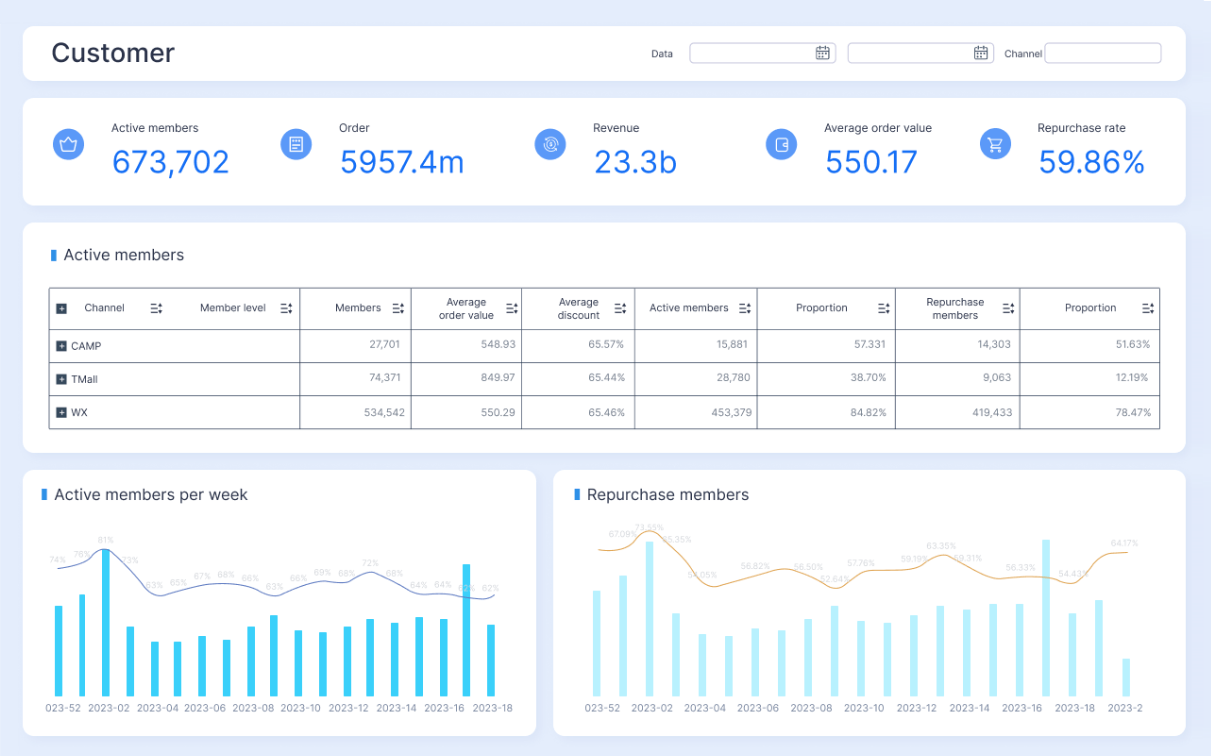
A customer insights dashboard gives enterprise teams one operational view of what customers are doing, what they are worth, where friction is building, and which actions improve revenue or retention. For IT managers, operations directors, revenue leaders, and analytics teams, this matters because customer data is rarely the problem. The real issue is fragmentation. Marketing sees campaign performance, sales sees pipeline activity, service sees ticket volume, and product teams see usage logs. Leadership gets disconnected reports and delayed answers.
A well-designed customer insights dashboard solves that by turning scattered signals into a shared decision layer. Instead of debating whose spreadsheet is correct, teams can identify churn risk earlier, spot revenue expansion opportunities faster, and respond to service issues before they damage renewals.
All dashboards in this article are created by FineBI
What a customer insights dashboard is and why enterprise teams rely on it
A customer insights dashboard is a centralized analytics environment that combines customer behavior, engagement, revenue activity, and service performance into a single decision-making view. It is not just a reporting screen. It is a business system for understanding the relationship between customer experience and commercial outcomes.
In enterprise settings, the dashboard typically pulls from multiple systems such as CRM, marketing automation, product analytics, e-commerce platforms, billing tools, and support desks. The goal is simple: make customer intelligence usable across departments.
What the dashboard should centralize
A strong customer insights dashboard brings together four major categories of information:
Customer behavior: how prospects and customers discover, use, and move through products or services
Revenue signals: how customer activity affects pipeline, conversion, expansion, and forecast accuracy
Service trends: where support demand, resolution issues, or escalations are increasing
Engagement performance: how campaigns, onboarding, lifecycle messaging, and account interactions perform over time
This centralized structure is what allows enterprise leaders to move from static reporting to coordinated action.
Why enterprise teams depend on a shared dashboard
Without a shared dashboard, teams often operate with conflicting definitions, different refresh schedules, and isolated KPIs. That creates three costly problems:
slow decisions
low trust in data
poor cross-functional alignment
With a shared customer insights dashboard, leadership can ask sharper questions and get faster answers:
Which segments are most likely to renew?
What usage patterns correlate with expansion revenue?
Where are customers dropping out of the funnel?
Are support delays affecting churn in strategic accounts?
Which acquisition sources create high-value customers rather than low-quality leads?
That is why enterprise teams rely on dashboards not just for visibility, but for operational coordination.
Raw customer data vs reporting vs actionable insight
These three terms are often used interchangeably, but they are not the same.
Raw customer data is the unprocessed activity captured in source systems: clicks, logins, transactions, emails, tickets, purchases, renewals, and account records.
Reporting organizes that data into summaries: monthly ticket counts, campaign open rates, pipeline totals, and product usage charts.
Actionable insight explains what matters and what to do next: for example, customers with low feature adoption and rising support volume are at elevated churn risk, so customer success should intervene within seven days.
A customer insights dashboard becomes strategic only when it closes that gap between reporting and action.
Core metrics enterprise teams should track
The best customer insights dashboard does not track everything. It tracks what helps teams make better decisions across acquisition, retention, growth, and service quality.
Key Metrics (KPIs)
Below are the core KPI categories enterprise teams should define clearly and monitor consistently:
Acquisition Source Performance: Measures which channels generate customers, qualified accounts, or high-value conversions.
Product Usage Frequency: Tracks how often customers engage with core features, products, or services.
Journey Drop-Off Rate: Shows where prospects or customers abandon onboarding, purchase, or adoption flows.
Campaign Response Rate: Measures opens, clicks, replies, conversions, or other engagement actions from campaigns.
Retention Rate: Indicates the percentage of customers who remain active or renewed over a defined period.
Churn Risk Score: Flags accounts showing behaviors linked to attrition, such as declining activity or rising support issues.
Lifecycle Stage Distribution: Segments customers by stage such as new, active, at-risk, renewing, or expanding.
Pipeline Health: Monitors opportunity volume, stage progression, aging, and coverage against targets.
Conversion Rate: Measures the percentage of leads, opportunities, or accounts moving to the next revenue stage.
Average Deal Value: Tracks the average revenue generated per closed deal or customer transaction.
Expansion Revenue: Captures upsell, cross-sell, seat growth, or add-on revenue from existing customers.
Account Growth Rate: Measures revenue or usage growth within existing customer accounts over time.
Support Volume: Counts incoming cases, tickets, chats, or service requests by channel or segment.
Resolution Time: Measures how quickly service teams resolve issues or close cases.
Customer Satisfaction Score: Captures post-interaction satisfaction, often through CSAT or similar surveys.
Renewal Intent: Indicates the likelihood of renewal based on surveys, account activity, or success manager input.
Escalation Trend: Tracks serious service issues, recurring incidents, or high-priority customer complaints.
Customer behavior and engagement signals
Customer behavior metrics help teams understand what drives activation, adoption, and retention. These are especially important for product-led businesses, subscription models, digital platforms, and B2B account programs.
Key behavior and engagement signals to track include:
acquisition sources by customer quality
first-touch and multi-touch attribution
product usage by feature, frequency, and depth
onboarding completion rates
customer journey drop-off points
campaign engagement by segment
repeat visits, repeat purchases, or repeat logins
lifecycle stage movement
inactivity windows and churn indicators
A critical enterprise use case is linking early engagement patterns to long-term value. If high-retention customers consistently complete onboarding within 14 days and use two core features in the first month, that becomes an operational playbook, not just an observation.
Revenue metrics turn customer activity into financial intelligence. This is where the customer insights dashboard becomes especially valuable to sales leadership, finance teams, and account managers.
Track these indicators closely:
pipeline volume and stage distribution
lead-to-opportunity conversion rate
opportunity-to-close conversion rate
average deal size
sales cycle length
renewal revenue
expansion revenue
account penetration by region, segment, or product line
forecast accuracy tied to customer activity patterns
The strongest dashboards connect behavior to outcomes. For example, accounts with higher product engagement may close expansions faster. Accounts with declining campaign response and lower usage may create forecast risk. When sales data and customer activity are analyzed together, forecast quality improves significantly.
Service, satisfaction, and loyalty measures
Service data is often undervalued until it starts damaging growth. In reality, support performance is one of the clearest early-warning systems for retention risk and loyalty decline.
Essential service and loyalty metrics include:
support case volume by issue type
first response time
average resolution speed
backlog volume
escalation rate
repeat issue rate
CSAT or service satisfaction score
NPS or loyalty indicator
renewal intent
complaint trend by customer tier
These measures help teams identify friction points that are easy to miss in revenue-only dashboards. A strategic account may still be spending today while showing signs of future dissatisfaction through growing ticket complexity, slow resolutions, and repeated escalations.
How teams use the dashboard to access and interpret analytics
The value of a customer insights dashboard is not just in the data displayed. It is in how different functions use the same data to make different decisions.
Turning dashboard views into decisions
Enterprise teams read a customer insights dashboard through their own operational lens:
Marketing teams look for acquisition quality, channel performance, campaign response, and segment behavior.
Sales teams focus on pipeline velocity, account engagement, conversion signals, and expansion potential.
Service teams monitor ticket trends, backlog, resolution performance, and customer pain points.
Leadership teams want cross-functional visibility into growth, retention, forecast quality, and customer health.
This shared visibility reduces siloed decision-making. It also makes meetings more productive because teams are discussing the same underlying numbers with different business questions in mind.
Three capabilities improve interpretation significantly:
Trend comparisons: compare current performance to prior periods, targets, or benchmarks
Segmentation: analyze behavior by region, product, account tier, lifecycle stage, or industry
Drill-down analysis: move from summary metrics into customer-level, issue-level, or cohort-level detail
These features matter because enterprise decisions are rarely made from one aggregate number. Teams need context, variance, and root-cause visibility.
Building trust in the data
No customer insights dashboard succeeds if teams question the numbers. Data trust is a governance issue as much as a technical one.
To build confidence, enterprise teams need:
clear metric definitions
standardized calculation logic
consistent time windows
reliable data refresh cadence
ownership for each KPI
access controls and governance rules
documented source systems
For example, "active customer" must mean the same thing across marketing, product, and finance. "Churn" must be defined uniformly. Refresh timing should be transparent so users know whether they are looking at intraday, daily, or weekly data.
Accurate analytics are essential because executive reporting, revenue planning, service staffing, and customer strategy all depend on them. When the dashboard becomes trusted, it becomes operationally indispensable.
How to build a customer insights dashboard that supports action
A customer insights dashboard should be designed backward from decisions, not forward from available data. That is where many enterprise projects fail.
Choose business goals before selecting metrics
Start with strategic questions, not chart ideas.
Examples include:
How do we improve retention in mid-market accounts?
Which customer behaviors predict expansion revenue?
Where is service friction reducing renewal likelihood?
Which acquisition channels produce the highest-value customers?
What signals should trigger success-team intervention?
Once the business questions are clear, select metrics that directly support those decisions. This prevents dashboard sprawl and keeps the experience useful.
A practical consultant approach is to limit the first version to a focused set of executive and operational KPIs. Teams can always expand later. They rarely benefit from starting with 60 widgets.
Design for clarity, usability, and accountability
Enterprise dashboards should be easy to scan and hard to misread. Good design is not cosmetic. It directly affects adoption and decision speed.
Best practices include:
group metrics by audience or workflow
place the most decision-critical KPIs at the top
use simple visualizations over decorative ones
add filters for segment, region, product, and time period
show benchmarks, targets, and threshold alerts
identify the business owner for each metric
Each metric should answer a question and have an owner who can act when performance moves out of range. Without accountability, dashboards become passive reporting tools rather than management systems.
Connect data sources across the customer journey
Enterprise insight requires journey-level visibility. That means connecting data from every meaningful customer touchpoint, such as:
CRM and opportunity systems
marketing automation platforms
product or application usage logs
e-commerce and billing systems
customer support tools
account management notes
survey and feedback systems
The purpose is not just integration for its own sake. It is to reveal cause and effect. For example:
low onboarding completion may predict churn
heavy support usage after implementation may reduce expansion likelihood
campaign engagement plus product adoption may improve conversion quality
declining account activity may weaken forecast confidence
When these systems remain siloed, teams can only optimize locally. A customer insights dashboard should help them optimize across the full customer lifecycle.
4 best practices for implementation
1. Standardize KPI definitions before building visuals
Create a metric dictionary first. Define churn, active account, expansion revenue, lifecycle stage, and satisfaction measures before anyone starts designing charts.
2. Launch with role-based views
Executives, sales managers, service leaders, and analysts do not need the same page layout. Build a shared data model with tailored views.
3. Add alerting for operational thresholds
Do not force users to monitor dashboards manually all day. Configure alerts for churn-risk spikes, service backlog growth, conversion drops, or declining expansion activity.
4. Review dashboard relevance quarterly
Customer behavior changes. So do business priorities. Schedule regular reviews to retire low-value metrics, add emerging signals, and refine ownership.
Common mistakes to avoid and how to keep the dashboard useful
Even well-funded enterprise dashboards fail when they become cluttered, unclear, or disconnected from decisions.
Common mistakes include:
tracking vanity metrics that look impressive but do not drive action
duplicating reports across teams with different numbers
building dashboards without a clear use case
overwhelming users with too many widgets or filters
failing to define ownership for key metrics
ignoring refresh cadence and data quality issues
letting the dashboard remain static while business priorities shift
To keep the dashboard useful, focus on the few measures that best reflect enterprise priorities. In many cases, a smaller dashboard with high-trust, decision-ready KPIs outperforms a larger one filled with noise.
A customer insights dashboard should evolve with the business. If it does not, adoption declines and teams revert to offline spreadsheets.
Why it matters for enterprise growth and customer strategy
A well-built customer insights dashboard improves more than reporting. It improves alignment, response speed, forecast quality, and customer experience across the enterprise.
When teams can see how engagement, revenue, and service performance interact, they make better decisions at every level:
marketing invests in channels that create durable value
sales prioritizes accounts with real expansion potential
service teams catch friction before it harms renewals
leadership gains a more accurate view of customer health and growth risk
This is what makes the dashboard strategically important. It supports both day-to-day management and long-term planning. It helps enterprises move from reactive reporting to proactive customer strategy.
Practical next steps
If you are evaluating or improving your current setup, start here:
Audit your current customer reporting stack and identify duplicate or conflicting dashboards.
List the top five customer-related decisions leaders need to make each month.
Define the KPIs that directly support those decisions.
Map the data sources required across CRM, marketing, product, commerce, and support.
Redesign the dashboard around action, ownership, and trust.
Build faster and scale smarter with FineBI
Building this manually is complex; use FineBI to utilize ready-made templates and automate this entire workflow.
For enterprise teams, the challenge is rarely just visualization. It is integrating fragmented systems, standardizing KPI logic, enabling self-service access, and delivering trustworthy insights at scale. FineBI helps solve that by giving teams a faster way to build a customer insights dashboard that is practical, governed, and usable across departments.
unify customer, revenue, and service analytics in one environment
deploy ready-made dashboard templates for faster rollout
support drill-downs, segmentation, and role-based access
automate refresh workflows and reduce manual reporting effort
improve consistency across enterprise KPI definitions
The business case is straightforward: if you try to build and maintain this entirely by hand, complexity grows quickly. FineBI shortens time to value and gives enterprise teams a scalable framework for turning customer data into decisions.
A high-performing customer insights dashboard is no longer optional for enterprises that want to grow efficiently and retain customers strategically. The right framework matters. The right platform accelerates it. FineBI helps you do both.
It should combine customer behavior, revenue signals, service trends, and engagement performance in one shared view. The most useful dashboards also connect these metrics to actions such as churn prevention, expansion targeting, and service improvement.
The most important KPIs usually include retention rate, churn risk, product usage, journey drop-off, conversion rate, pipeline health, support volume, and expansion revenue. The right mix depends on whether your priority is acquisition, retention, growth, or service quality.
Standard reporting summarizes what happened, while a customer insights dashboard helps teams understand why it happened and what to do next. Its value comes from connecting data across systems so decisions can be made faster and with more confidence.
Differences often come from refresh timing, metric definitions, filters, and authorization rules. A dashboard may use standardized or delayed analytical data, while source systems may show live operational data.
It helps teams spot risk patterns early, such as falling usage, rising support issues, or drop-offs in onboarding. By surfacing these signals quickly, teams can intervene sooner and focus on the accounts most likely to renew, expand, or need support.
Product Trial
FineReport
Pixel-perfect reports · Interactive dashboards · Easy data entry · Digital twins





 For enterprise teams, the challenge is rarely just visualization. It is integrating fragmented systems, standardizing KPI logic, enabling self-service access, and delivering trustworthy insights at scale.