HR reporting becomes truly valuable when it gives executives a reliable monthly view of workforce health, hiring progress, and retention risk in one place. Leaders do not need scattered updates from HR, recruiting, finance, and department heads. They need a trusted reporting and operational cockpit that shows what changed, why it matters, and where action is required.
With FineReport + Dora, teams can ask for a report summary in chat, generate structured narratives from trusted report assets, receive scheduled briefings, and push exceptions to the right owner. That means less time manually preparing HR packs and more time acting on workforce issues such as understaffing, rising attrition, delayed hiring, or labor cost pressure.
Click To Try The Dashboard
All reports in this article are built with FineReport
What HR Reporting Means for Executive Decision-Making
HR reporting is the process of turning workforce data into structured, decision-ready information. Raw people data may sit across HRIS, ATS, payroll, attendance, and organizational planning tools. HR reporting organizes that information into a clear monthly picture executives can use.
In practice, that means moving from questions like:
Raw data tells you what exists in systems. HR reporting tells leaders what matters. It adds KPI definitions, time periods, filters, comparisons, and business context. For example, a resignation count alone is not enough. Executives need to know whether turnover is voluntary or involuntary, concentrated in a specific function, above normal trend, or affecting priority teams.
A monthly workforce view is more useful than disconnected weekly updates because executive decisions usually require a stable reporting cadence. Weekly snapshots can be noisy. A monthly dashboard provides enough signal to support decisions on:
Cost: whether headcount aligns with budget and productivity expectations
Retention: whether critical teams are losing talent too quickly
Hiring priorities: which roles or departments need intervention first
For executives, strong hr reporting creates a common operating view across HR, finance, and business leadership. For IT and reporting teams, it creates a repeatable reporting framework rather than ad hoc dashboard requests. For HR business partners, it creates a better way to explain workforce shifts with evidence.
A monthly executive workforce dashboard should stay focused. The goal is not to display every HR metric available. It is to surface the workforce indicators that leadership uses to allocate budget, manage organizational risk, and adjust hiring or retention strategy.
The essential metrics usually include:
Headcount
Turnover
Hiring volume
Open roles
Time-to-fill
These should be shown at two levels:
Company-wide indicators for the executive summary
Department, location, and manager-level views for drill-down and accountability
A strong dashboard also needs a defined reporting process:
monthly reporting date
data refresh schedule
source systems and ownership
reconciliation rules across HR, finance, and recruiting
approval workflow before executive distribution
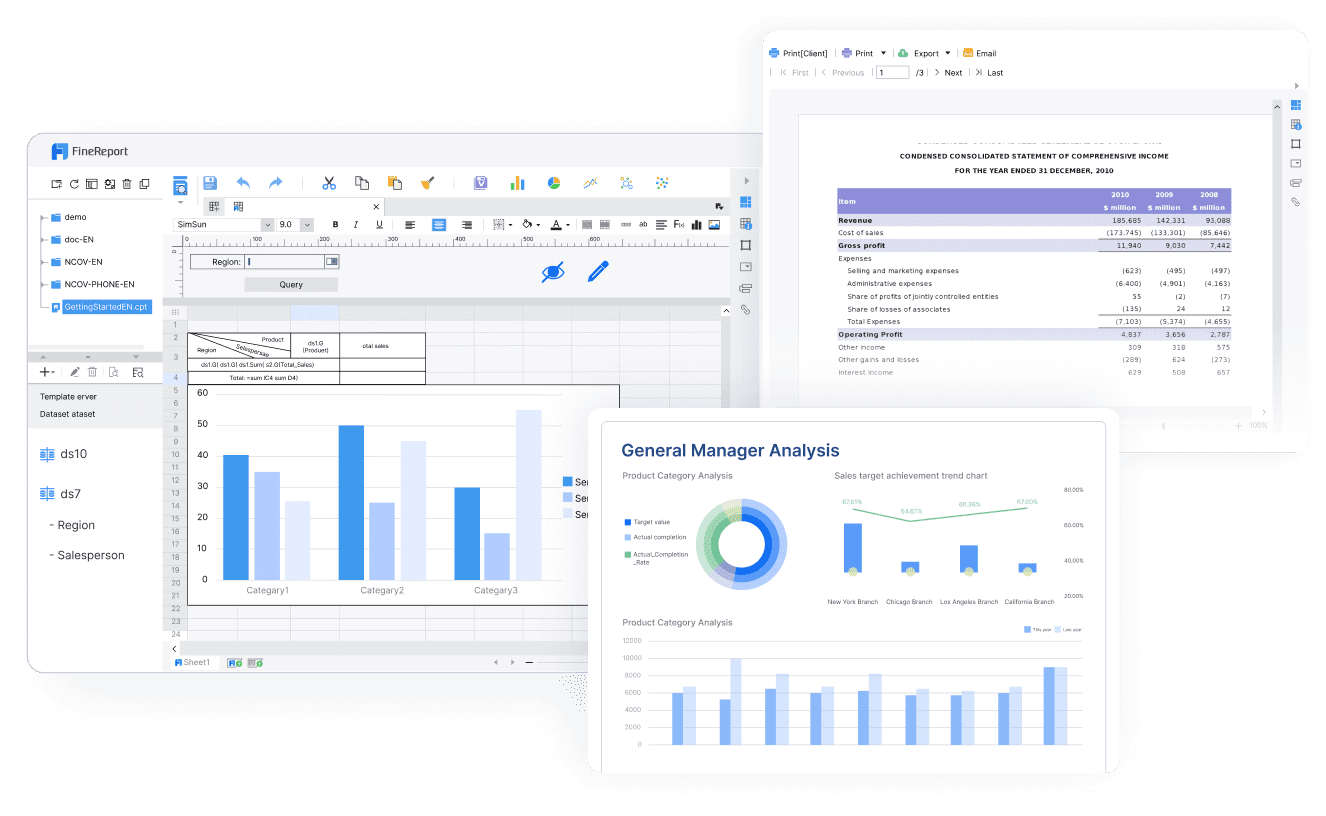
FineReport is especially effective here because it provides the trusted reporting foundation: formatted reports, complex workforce reports, management cockpits, and reporting workflows that standardize how HR data is presented every month.
Headcount
Headcount is the base layer of executive hr reporting. It shows workforce scale, change, and organizational allocation.
Report Element: Total headcount, net change, growth rate, and organizational distribution Business value: Helps leaders understand whether the workforce is expanding, contracting, or shifting in ways that affect delivery, cost, and planning. AI use:Dora can summarize month-over-month headcount changes, explain which departments drove the change, and include the results in a scheduled management briefing.
Report Element: Actual headcount vs plan, budget, or approved target Business value: Shows whether the company is hiring ahead of plan, lagging behind approved growth, or carrying unplanned labor cost. AI use:Dora can highlight variances, identify which functions are over or under target, and push an exception summary to HR and finance owners.
Executives should be able to see not only the total number of employees but also how headcount is distributed by:
business unit
function
geography
legal entity
manager hierarchy
employment type where relevant
That structure matters because total growth alone can hide problems. Overall headcount may be on plan while a priority sales region, plant, or product team remains understaffed.
Turnover
Turnover reporting tells executives whether retention is stable or becoming a business risk. It should not be limited to one top-line rate.
Report Element: Voluntary, involuntary, regrettable, and early-tenure turnover Business value: Separates normal workforce movement from high-cost talent loss and hiring quality issues. AI use:Dora can generate a structured report summary explaining which type of turnover increased, where it happened, and whether it requires leadership follow-up.
Report Element: Trend lines, high-risk teams, and turnover drivers Business value: Helps leaders identify whether attrition is isolated or systemic and whether intervention is needed in management, compensation, workload, or hiring quality. AI use:Dora can detect abnormal movement, summarize trend changes in chat, and send exception alerts to responsible HR business partners or department leaders.
Turnover reporting becomes more actionable when it answers:
Which functions have the highest voluntary attrition?
Are exits concentrated among newer employees?
Are critical roles showing regrettable losses?
Which managers or sites need deeper review?
Is turnover worsening relative to prior months or the same period last year?
For executive use, the turnover section should emphasize business risk, not only percentages. A 2-point increase in turnover matters more when it affects hard-to-replace engineers, revenue-producing teams, or already understaffed operations.
Hiring metrics show whether talent acquisition is supporting business demand fast enough.
Report Element: Hires, offer acceptance, pipeline health, and time-to-fill Business value: Shows if recruiting is converting demand into actual staffed positions and where delays may affect execution. AI use:Dora can summarize hiring performance by department, explain bottlenecks in the recruiting funnel, and include late-fill risks in a weekly or monthly briefing.
Report Element: Hiring results tied to vacancy risk and workforce planning needs Business value: Connects recruiting output to business capacity, service levels, project delivery, or sales expansion. AI use:Dora can flag high-risk open roles, monitor overdue requisitions, and push alerts to owners when time-to-fill crosses thresholds.
Executives should see more than total hires. They need answers to operational questions:
Are critical roles staying open too long?
Which teams have the largest vacancy backlog?
Is offer acceptance falling in specific markets?
Are hiring results aligned with growth plans?
Which recruiting bottlenecks create business risk?
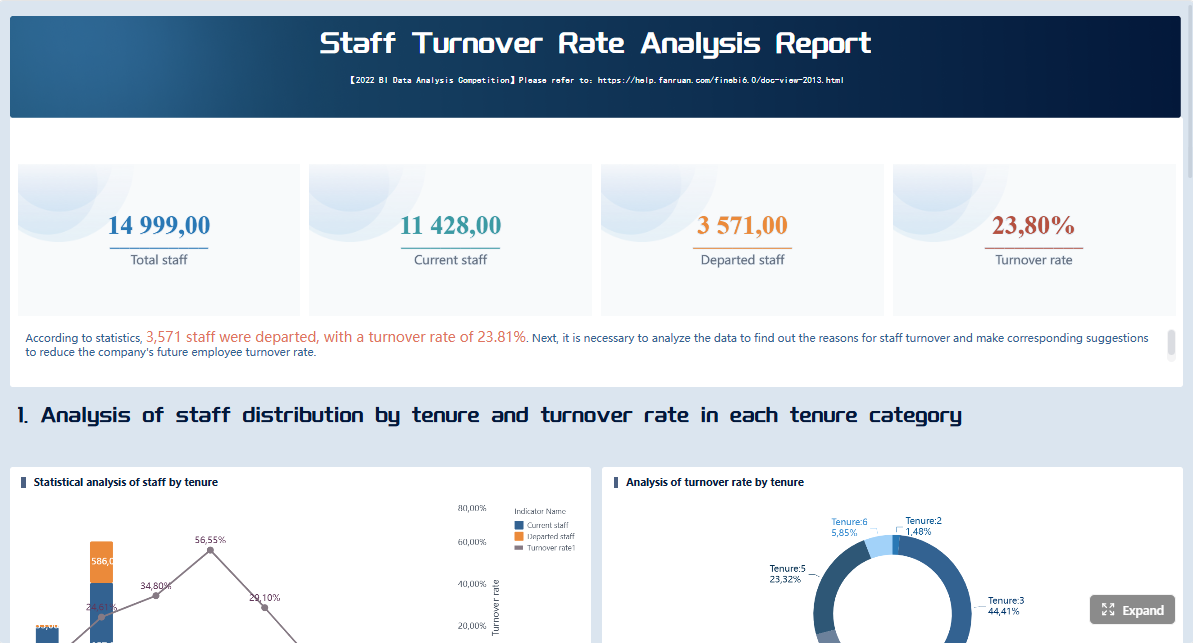
A well-built FineReport monthly hiring report can combine KPI cards, trend charts, aging views for open roles, and recruiter or department ownership lists. That turns hiring data into an operational cockpit, not just a static summary.
Choose the Most Useful HR Reports for a Monthly Executive Pack
Executive packs work best when they are selective. Too many charts reduce clarity. The most useful hr reporting packages combine a short summary page with a small set of high-value reports and a concise narrative on changes, risks, and recommended actions.
A practical monthly pack should prioritize:
decision relevance
comparability month to month
clear ownership
a direct link between metric and management action
Include the seven reports leaders need most often
Below are the core reports most executives need in a monthly workforce package.
Workforce summary
Report Element: Company-wide snapshot of headcount, turnover, hiring, vacancies, and labor cost indicators Business value: Gives leadership a fast overall view of workforce health. AI use:Dora can produce a one-paragraph management narrative from the FineReport executive summary page.
Headcount movement report
Report Element: Opening headcount, hires, transfers, exits, and closing headcount by function or location Business value: Shows exactly how the workforce changed during the month. AI use:Dora can explain net movement drivers and call out functions that diverged from plan.
Turnover and retention report
Report Element: Voluntary, involuntary, regrettable, and early-tenure turnover with trend comparison Business value: Helps identify retention risks before they become expensive. AI use:Dora can highlight abnormal spikes and prepare follow-up lists for HR business partners.
Hiring and recruiting performance report
Report Element: Requisitions opened, hires completed, offer acceptance, time-to-fill, and pipeline conversion Business value: Connects recruiting speed and effectiveness to business staffing needs. AI use:Dora can generate exception summaries for aging roles and delayed functions.
Report Element: Representation by gender, age band, level, function, or other approved diversity dimensions Business value: Supports leadership visibility into workforce composition and talent pipeline health. AI use:Dora can summarize changes and point out areas that need targeted hiring or development attention.
Absence and leave trends
Report Element: Absenteeism, leave volume, recurring absence patterns, and department hotspots Business value: Helps leaders monitor workforce availability, burnout signals, and operational impact. AI use:Dora can flag unusual changes and add them to scheduled workforce briefings.
Labor cost or compensation overview
Report Element: Labor cost trend, compensation distribution, budget variance, and cost by department Business value: Links workforce decisions to financial performance. AI use:Dora can summarize cost increases, explain which areas drove the change, and support finance review with a chart-based answer.
Adapt report types for board, CEO, and functional leaders
The same workforce data should not be presented identically to every audience.
Board: Needs concise trend summaries, risk indicators, and strategic implications
CEO and executive team: Needs company-wide status plus action-oriented exceptions
Functional leaders: Need more operational detail by department, region, and manager
This is where FineReport’s reporting flexibility matters. Teams can standardize one governed data model and reporting logic, then publish different report layouts for different audiences. Executives get a concise workforce cockpit, while HR and finance partners retain access to supporting drill-downs and formatted detail reports.
Dora adds another layer of usability. Instead of manually rewriting the same commentary for each audience, Dora can help produce structured report summaries tailored to the board, CEO, or departmental review based on trusted FineReport assets and approved KPI definitions.
How an AI Data Agent Automates Report Consumption
Monthly hr reporting often breaks down not because the dashboard is missing, but because report consumption is still manual. HR analysts export data, recheck definitions, write commentary, email stakeholders, answer repeat questions, and chase owners for follow-up.
This is where Dora, FanRuan’s enterprise Data Agent platform, changes the workflow.
For this scenario, the most relevant Dora digital employees are:
Daily Briefing Secretary for scheduled monthly workforce summaries
Risk Alert Officer for turnover or hiring exception monitoring
Data Analyst digital employee for chat-based HR metric questions
FineReport remains the trusted reporting and semantic foundation. It stores the governed reports, workforce dashboard views, KPI definitions, report templates, filters, and access permissions. Dora sits on top of that foundation as an AI assistant layer that helps users consume, summarize, query, push, and follow up on the report.
“Summarize this month’s workforce dashboard, highlight departments with abnormal voluntary turnover, show headcount vs plan, and list open roles with time-to-fill risk.”
Here is how the AI workflow can run in a real enterprise setting:
Retrieve the trusted FineReport workforce dashboard and related HR reports Dora accesses the approved monthly headcount, turnover, hiring, and labor cost reports already built in FineReport.
Understand KPI definitions, business terms, filters, and permissions Dora uses the governed semantic layer: what counts as headcount, how voluntary turnover is defined, which date logic applies, and which user can see which business unit.
Generate a structured report summary in chat Dora creates a management-ready narrative such as: headcount increased 2.4% month over month, turnover rose in customer support, and three priority engineering roles exceeded time-to-fill thresholds.
Detect exceptions and risk signals
The Risk Alert Officer can flag early-tenure attrition above threshold, departments under staffing plan, or open requisitions aging beyond target.
Push alerts and summaries to responsible owners Dora can send scheduled monthly briefings to executives, targeted exception summaries to HR business partners, and role-specific alerts to recruiting managers.
Create follow-up records and periodic review summaries Dora helps document what was flagged, who owns the action, and what needs review in the next reporting cycle.
This matters because most executives do not want another reporting portal to search manually. They want timely answers and short, trustworthy summaries. Dora delivers that through natural-language query over trusted reporting assets, not by guessing from ungoverned data.
Why this AI reporting model lands better in enterprises
A lot of AI reporting demos look impressive but fail during rollout because they lack governance. Enterprise HR reporting needs:
KPI consistency
trusted report templates
permission control
stable workflows
auditable logic
controlled execution paths
That is why Dora should be positioned as fourth-generation Agentic BI, not a generic chatbot.
The workflow is:
natural-language request
trusted semantic layer
governed query or Skill execution
report summary, answer, exception push, action, and follow-up
This approach typically offers better enterprise landing capability than prompt-only agent tools because it is built around existing reporting assets and governed workflows. It is also better suited to reducing token waste, improving response speed, and increasing workflow stability than relying on open-ended prompts alone, especially for recurring monthly reporting scenarios.
For executives, the ROI is clear: Dora is not an AI experiment. It is a practical AI digital employee for recurring workforce reporting work such as monthly executive packs, hiring reviews, attrition alerts, labor cost summaries, and owner follow-up.
For IT teams, the role shifts from manually responding to every dashboard change request to strengthening the data foundation: connections, semantics, KPI governance, permissions, report templates, and reusable agent Skills.
For business users in HR, finance, and operations, Dora reduces reporting friction. They can receive timely summaries, chat-based answers, scheduled briefings, and exception pushes without waiting for analysts to manually prepare every explanation.
The purpose of hr reporting is not to publish charts. It is to support action.
Reporting tells you what happened. Analytics helps you understand why it happened and what to do next. The shift usually starts when a metric moves outside expected range or diverges from plan.
For example:
Headcount is under plan in a growth region
Voluntary turnover rises in a critical team
Offer acceptance drops in a specific market
Time-to-fill increases for high-priority roles
Absence spikes in one site or function
At that point, leaders need comparisons, trends, and benchmarks to decide whether the issue is temporary noise or a meaningful business problem.
A practical way to make dashboards actionable is to pair every major metric with:
a decision question
an owner
a follow-up action
Examples:
Headcount vs plan: Do we need to reallocate hiring approvals? Owner: HR + Finance + business leader Follow-up: Review staffing gaps in priority functions.
Voluntary turnover: Do we need retention intervention in high-risk teams? Owner: HRBP + department leader Follow-up: Investigate manager, pay, or workload drivers.
Time-to-fill: Are open roles delaying execution? Owner: Talent acquisition leader + hiring manager Follow-up: Escalate critical roles, revise sourcing strategy, or adjust role requirements.
This is another place where Dora adds value. Instead of stopping at dashboard display, Dora can support governed AI workflow execution by generating action-oriented summaries, flagging exceptions, and pushing the right follow-up prompt to the right owner.
Common challenges and how to solve them
Inconsistent definitions across HR, finance, and talent acquisition
If HR defines headcount one way and finance defines it another, executive trust drops fast.
Solution: Standardize KPI logic and publish it through FineReport report templates and semantic definitions. Dora then uses those same governed definitions when answering questions or generating summaries.
HR reporting often depends on HRIS, ATS, payroll, and planning data that refresh on different schedules.
Solution: Establish a fixed monthly data refresh process and dashboard publication calendar. Use FineReport to centralize the reporting output and Dora to communicate whether a report is final, refreshed, or pending.
Too many metrics with too little executive context
Leaders do not want every HR metric. They want insight.
Solution: Keep the executive pack focused on decision-relevant KPIs and add a concise narrative explaining changes, risks, and recommendations. Dora can generate this structured report summary automatically from the trusted report set.
Limited trust in data quality or reporting logic
If leaders doubt the numbers, they will not act on them.
Solution: Treat data quality as part of the reporting implementation, not an afterthought. Reconcile key metrics before distribution, preserve drill-through access to supporting detail, and use controlled Skills in Dora so AI outputs remain tied to governed report assets.
Present the Dashboard Clearly Every Month
A good executive workforce dashboard should be easy to scan in minutes.
The best format is usually:
a one-page summary for executives
supported by drill-down views for HR, finance, and recruiting partners
focused on changes, exceptions, and business impact
Instead of listing every available metric, prioritize:
month-over-month changes
plan or budget variance
threshold breaches
notable outliers by function or location
actions and owners
Concise commentary matters. Each section should answer:
What changed?
Why does it matter?
What should leaders do next?
FineReport is well suited for this because it can produce both formatted executive reports and interactive operational cockpits. A leader can review the monthly summary, then drill into turnover by manager or hiring delays by location without switching tools or rebuilding analysis manually.
Dora extends this by making report consumption easier. An executive can ask for a chart explanation, request a short summary before a meeting, or receive a scheduled briefing every month. That is especially useful when stakeholders want answers but do not have time to navigate every view themselves.
Monthly dashboard checklist
Use this checklist before every executive distribution:
Confirm metric definitions and date ranges
Validate headcount, turnover, and hiring numbers
Review notable shifts by function or location
Finalize insights, actions, and stakeholder distribution
A monthly hr reporting process becomes sustainable when the reporting model, governance, and AI workflow are designed together.
1. Standardize KPI definitions, business terms, and report templates
Headcount, turnover, time-to-fill, open role aging, and labor cost must have agreed logic. FineReport helps teams lock these definitions into reusable report templates. Dora then works from the same trusted structure when generating summaries or answering questions.
2. Start with high-value recurring reports
Do not try to automate every HR report first. Begin with the executive monthly workforce pack because it is repetitive, visible, and tied to real decisions. This makes Dora’s Daily Briefing Secretary or Report Researcher immediately useful.
3. Build a semantic layer inside the reporting workflow
AI results improve when business terms are governed. Define what each KPI means, which filters apply, and how users should interpret movement. FineReport provides the governed reporting foundation; Dora uses that semantic context to deliver more controllable and auditable answers.
4. Define exception rules, responsibility paths, and escalation logic
AI is most useful when it supports action, not just summary. Set thresholds for headcount variance, regrettable turnover, vacancy aging, or absence spikes. Then map who should receive alerts, who owns follow-up, and when issues escalate. This is where Dora’s Risk Alert Officer can become a practical digital employee.
5. Preserve permission governance and use human review for narratives
HR data is sensitive. AI outputs must respect FineReport access boundaries. Start with human review for AI-generated report narratives, especially for executive commentary, and gradually expand governed Skills as confidence grows.
Building this manually is complex. FineReport helps teams standardize trusted reports, operational cockpits, templates, and reporting workflows. Dora turns those assets into an AI assistant that can answer report questions in chat, generate structured summaries, push scheduled briefings, monitor exceptions, and follow up with responsible owners.
For hr reporting, that means the enterprise can move from:
HR manually compiling monthly workforce packs
executives reading static files without context
repeated email questions on definitions and changes
delayed follow-up on turnover or hiring risks
to a more scalable operating model:
FineReport publishes the governed monthly workforce dashboard
Dora enables natural-language query over trusted reporting assets
Dora generates structured report summaries and chart explanations
Dora pushes exception alerts to HR, recruiting, or business owners
Dora supports follow-up records and ongoing review
FineReport + Dora is not only a reporting upgrade; it is a practical fourth-generation Agentic BI path.FineReport provides governed reports and operational cockpits. Dora provides the AI assistant layer for scenario execution, with more controlled Skills, lower token waste, faster execution paths, and more stable workflows than prompt-only agents.
Get Ready-to-Use Dashboard Templates in Fine Gallery
The strongest Dora pitch is scenario + product + service: FineReport provides the trusted reporting foundation, Dora provides the AI digital employee, and implementation service connects data, governance, semantic setup, Skills, report templates, permissions, and rollout.
For executive workforce reporting, that combination is what makes the solution practical. The dashboard gets built correctly. The definitions stay governed. The AI layer becomes usable in real monthly workflows. And leaders get faster, clearer workforce insight without adding reporting chaos.
A strong monthly dashboard usually includes headcount, turnover, hiring volume, open roles, and time-to-fill, along with comparisons to plan or budget. Executives also need simple drill-down views by department, location, and manager to see where action is needed.
Monthly reporting gives leaders a more stable view of workforce trends and reduces noise from short-term fluctuations. It is better suited to budgeting, hiring decisions, and retention planning that typically happen on a monthly cadence.
Focus on a small set of decision-oriented metrics, define each KPI clearly, and add business context such as trends, targets, and exceptions. The goal is to show what changed, why it matters, and who should act.
HR reporting organizes workforce data into consistent dashboards and summaries that leaders can review regularly. HR analytics goes further by exploring causes, patterns, and predictions behind those numbers.
FineReport can standardize workforce dashboards and reporting workflows across HR, finance, and recruiting data. Dora can summarize monthly changes, generate executive briefings, and send exception alerts to the right owners.
Product Trial
FineReport
Pixel-perfect reports · Interactive dashboards · Easy data entry · Digital twins